What is DNS and why it matters for your business
Most businesses only discover what DNS is when it stops working — here is what you need to know before that happens.
It was a Monday morning when the calls started. A small accounting firm in Manchester had spent the weekend at a trade show handing out business cards — and now, every single prospect who typed their web address into a browser got an error. The phones rang with confused clients. The inbox filled with bounced emails. The website wasn't hacked. The server wasn't down. The hosting was paid up. The culprit? A DNS record that had quietly expired over the weekend, and nobody had noticed.
That story plays out every week, in businesses of every size. And it all comes down to something most people have never had to think about — until it breaks.
The phone book analogy — why the internet cannot work without DNS
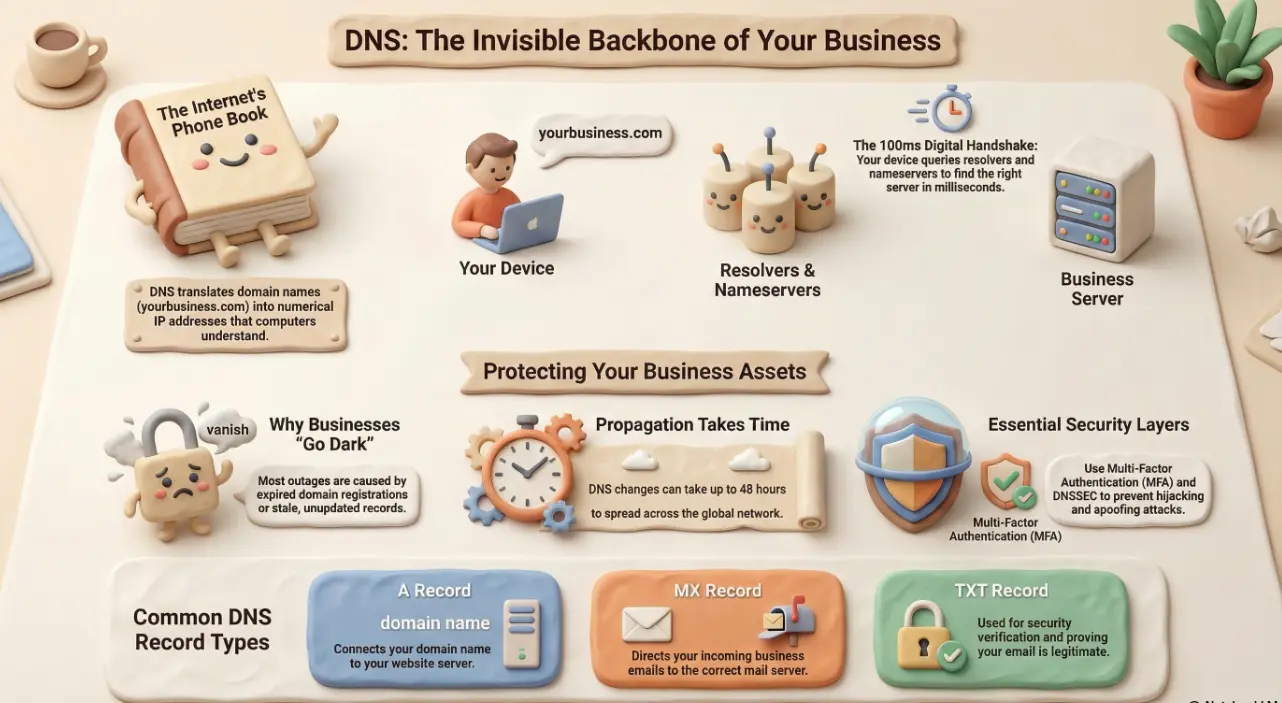
Think back to printed phone books. You knew your friend's name, but to actually call him, you needed his number. The book translated the name into something the telephone network could use.
DNS — Domain Name System — does exactly the same job for the internet. You know a website as www.yourbank.com. Your computer, however, needs a numerical address called an IP address (something like 104.26.11.58) to actually find it.
DNS is the system that translates one into the other, invisibly, in fractions of a second, every time you click a link or open your email client. Without it, you'd need to memorise a string of numbers for every website you visit. The internet as we know it simply wouldn't work.
What actually happens when you type a web address
When you type a web address and press Enter, a quiet but rapid conversation happens behind the scenes:
- Your device asks a resolver (usually run by your internet provider or IT team) if it knows the address.
- If it doesn't, the resolver asks a root server — one of a small number of authoritative directories at the top of the DNS hierarchy.
- That points the resolver toward the correct nameserver for the domain.
- The nameserver returns the IP address your browser needs.
- Your browser connects, and the page loads.
The whole process typically takes under 100 milliseconds. Your phone book lookup, delivered before you've finished blinking.
DNS records explained — A, MX, CNAME and TXT without the jargon
Inside every domain's DNS settings is a set of records — each one a different type of instruction. Here are the four you're most likely to encounter:
- A record — Points your domain name to a web server's IP address. This is what makes your website load.
- MX record — Tells the internet which server handles your email. If this is wrong or missing, email bounces.
- CNAME record — A redirect from one name to another. Often used for subdomains like
mail.yourdomain.com. - TXT record — A plain text field used for verification and security — including SPF and DKIM records that tell the world your emails are legitimate.
Getting any of these wrong — or letting them expire — can silently break email delivery, website access, or both.
Why DNS breaks and what it costs your business when it does
DNS doesn't usually fail dramatically. It tends to expire quietly, get misconfigured during a server migration, or get locked to an old hosting provider that's no longer in use. The result is the same: your website goes dark, your email stops delivering, or both — and from the outside it looks like your business has simply vanished.
Common causes include:
- A domain registration that lapses because auto-renewal wasn't enabled 🕐
- DNS records that were never updated after switching hosting or email providers
- A nameserver change that propagates incorrectly across the global DNS network
- A third-party service (payment processor, booking system) that stops working because its verification TXT record was deleted
DNS propagation — the time it takes for changes to spread worldwide — can take up to 48 hours. That's 48 hours where different users around the world may see different results for your domain.
DNS security — how attackers exploit it and how to protect your domain
DNS is trusted infrastructure, which is exactly why attackers target it. Two threats stand out.
DNS spoofing (cache poisoning) is when an attacker corrupts a resolver's cache to redirect users from your legitimate site to a fraudulent one — without the user knowing they've been sent anywhere wrong.
DNS hijacking goes further: attackers gain access to your domain registrar account and change your nameservers entirely, pointing your domain wherever they choose.
Protections worth implementing include:
- DNSSEC — a digital signature layer that verifies DNS responses haven't been tampered with
- Registrar lock — prevents unauthorised transfers or changes to your domain
- MFA on your registrar account — the single most effective deterrent against hijacking
- Regular audits of all DNS records to remove stale or unknown entries
DNS is quiet infrastructure — which means it rarely gets attention until something goes wrong. Partnering with a managed IT provider means your DNS records, domain renewals, and DNSSEC configuration are monitored and maintained as part of our 24/7 service desk, not left to be discovered broken on a Monday morning.
🌐 Is your DNS being monitored — or just assumed to be fine?
Andi-Tech manages DNS configuration, domain renewals, DNSSEC setup, and record audits as part of our proactive managed IT service — so expired records and misconfigurations get caught before they take your business offline.
Contact us at info@andi-tech.com
— let's make sure your domain is solid, secure, and never quietly disappearing.