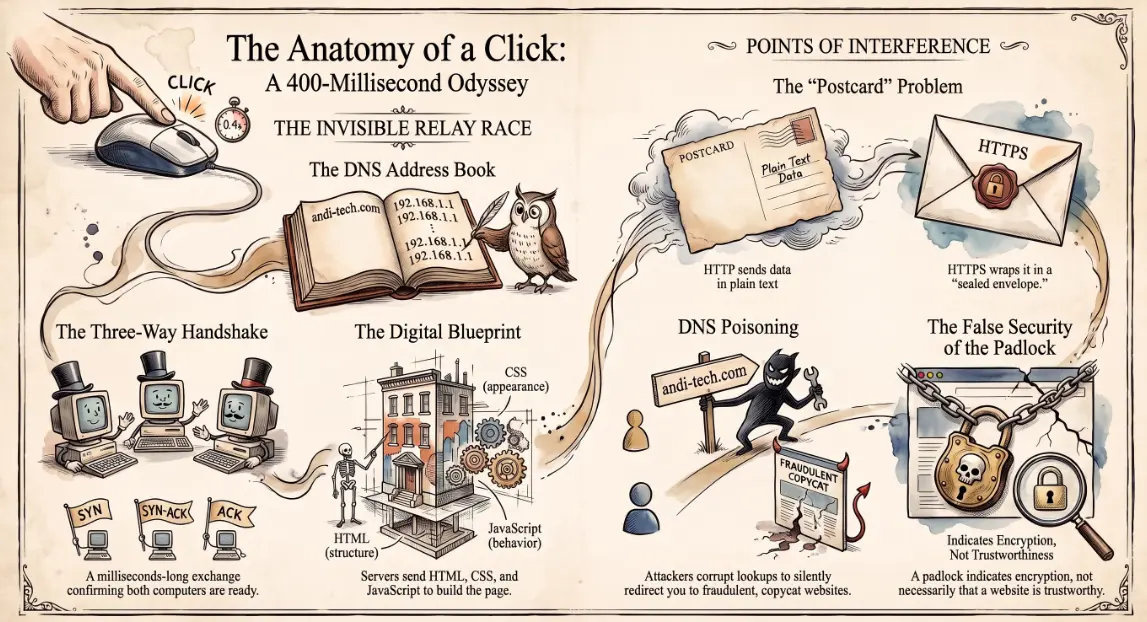
What happens when you click a link — explained simply
Right now, somewhere in the world, someone is clicking a link. By the time their finger lifts from the mouse button, that click will have triggered a conversation between dozens of computers across multiple countries, involving cryptographic handshakes, address lookups, and data transfers — all completing in under half a second. Nobody told them any of this was happening. It just worked.
But understanding what happens in those 400 milliseconds is one of the most useful things anyone who uses a computer for work can know. Because it is also the map that attackers use to find their way in.
The browser sends a request — HTTP, HTTPS, and why the padlock matters
When you click a link, your browser reads the web address and identifies the protocol — the set of rules governing how the conversation will happen. Most addresses begin with either http:// or https://. The difference is significant.
HTTP (HyperText Transfer Protocol) sends data in plain text. Think of it like sending a postcard: anyone who handles it along the way can read what is written on it. HTTPS adds a security layer — TLS encryption — that wraps the postcard in a sealed envelope. Only the intended recipient can open it.
The padlock icon in your browser's address bar tells you the connection is encrypted. It does not tell you the website is trustworthy — only that the conversation between your browser and that site is private. A phishing site can have a padlock. 🔒
DNS lookup — finding the address before the journey starts
Before your browser can send anything, it needs to know where to send it. Web addresses like andi-tech.com are human-readable labels. The internet, however, works with numerical addresses called IP addresses — something like 104.26.11.58.
The Domain Name System (DNS) is the directory service that translates one into the other. The moment you click a link, your device sends a quiet question to a DNS server: "What is the IP address for this domain?" The DNS server replies, and your browser now knows where to go.
This lookup happens before any webpage content is requested. It is also one of the points attackers target. DNS poisoning — where a malicious actor corrupts the lookup and sends you to a fake IP address instead — can redirect you to a convincing copy of a legitimate site without you ever noticing the address bar changed. 🎣
The TCP handshake — how two computers agree to talk
With the IP address in hand, your browser needs to establish a connection. This happens through a process called the TCP handshake — a brief, three-step exchange that confirms both your device and the server are ready to communicate reliably.
It works like the beginning of a phone call:
- Your device says: "Hello, are you there?" (SYN)
- The server replies: "Yes, I'm here. Are you?" (SYN-ACK)
- Your device confirms: "Got it. Let's go." (ACK)
This exchange takes milliseconds. If the server is too far away, under heavy load, or unreachable, this is where the delay or failure first appears — and why a slow website often feels like it "hangs" before anything loads.
The server responds — what HTML, CSS, and JavaScript actually are
Once the connection is established, your browser sends its actual request: "Please send me this page." The server finds the relevant files and sends them back.
What arrives is not a picture of a webpage — it is a set of instructions your browser follows to build one:
- 🦴 HTML (HyperText Markup Language) — the structure and content. The skeleton: headings, paragraphs, images, links.
- 🎨 CSS (Cascading Style Sheets) — the appearance. The skin: colours, fonts, layout, spacing.
- 💪 JavaScript — the behaviour. The muscles: the code that makes buttons respond, forms validate, and content update without reloading the page.
Your browser receives these files, reads the instructions, and assembles the page you see — all before you have finished blinking. Modern web pages may make dozens of separate requests to load all their components, each following the same journey.
Why this journey matters for security — where attackers can intercept it
Every stage of this process is a potential point of interference:
- 🖥️ Before the DNS lookup — malicious software on your device can redirect requests before they even reach a DNS server, sending you to attacker-controlled sites regardless of what address you type
- 🌐 At the DNS level — DNS hijacking or poisoning can silently redirect legitimate domain names to fraudulent IP addresses
- ☕ In transit — on unencrypted HTTP connections, anyone on the same network (a coffee shop Wi-Fi, a compromised router) can read or modify the data passing through
- 🖧 At the server — a site that looks legitimate may have been compromised, serving malicious content from an otherwise trusted address
The journey from click to webpage is fast because it has been engineered to be. But speed does not mean safety. Each hop in the chain — your device, your network, the DNS lookup, the connection, the server — is a place where something can go wrong, or be made to go wrong deliberately.
Understanding this journey is why IT teams enforce HTTPS across all internal and external services, run DNS filtering to block known malicious domains before a connection is ever made, and monitor endpoint behaviour for signs that a device's requests are being silently redirected. Andi-Tech's cybersecurity solutions include DNS filtering, HTTPS enforcement, and endpoint protection — managing the security of every hop in that half-second journey so your team can click with confidence.
🔗 Every link your team clicks makes the same invisible journey — is yours being protected along the way?
Andi-Tech manages DNS filtering, HTTPS enforcement, and endpoint security for SMBs — so the infrastructure your team relies on every day is protected at every stage of the connection, not just at the front door.
Contact us at info@andi-tech.com
— let's make sure every click your business makes lands somewhere safe.