What is shadow IT risk for small business
Somewhere in your business right now, a file is living in a place IT has never heard of. It might be the marketing team's client contracts sitting in a free Dropbox account that someone set up with a personal email address. It might be the sales director's pipeline in a Notion workspace that nobody approved. It might be the operations team's shift rota managed through a WhatsApp group — complete with employee names, phone numbers, and schedules.
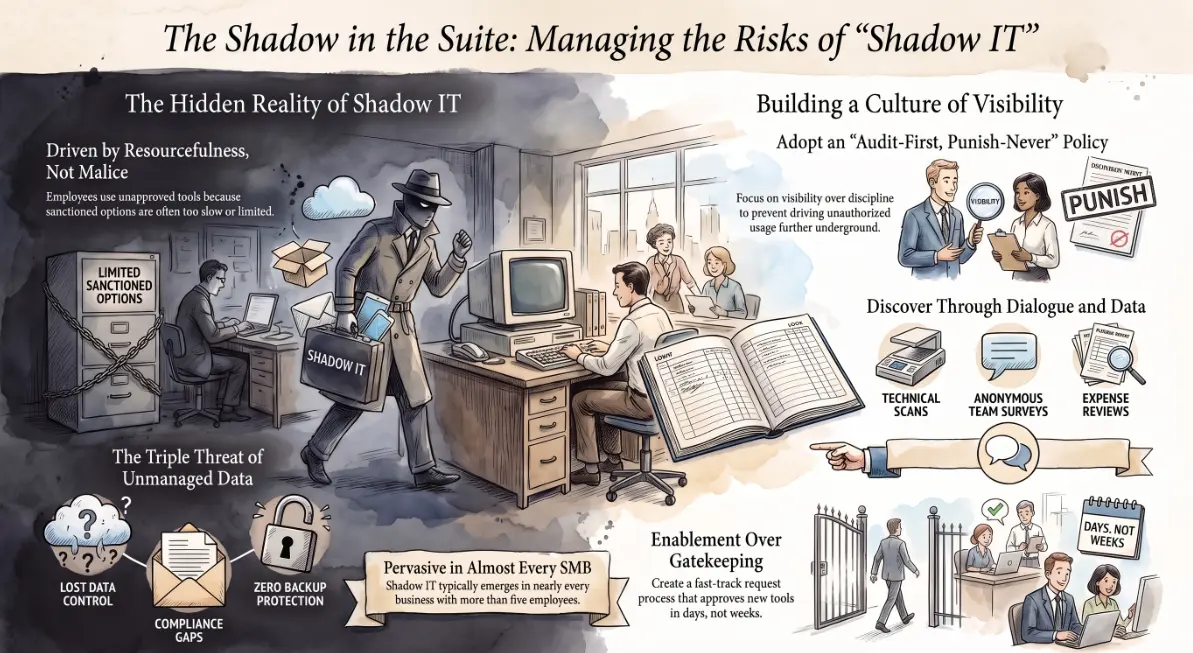
Nobody did anything wrong, exactly. They just needed to get something done, and the approved tools were too slow, too limited, or too hard to get access to. So they found something else. That is shadow IT — and it is happening in almost every business that has more than five people.
What shadow IT looks like in a typical SMB
Picture a typical Wednesday in a 30-person professional services firm. The account manager downloads a free PDF editor because the company's one Adobe licence is always in use. The project coordinator sets up a Trello board for a client because the internal project management tool requires an IT ticket to add new projects. The finance assistant starts using a free ChatGPT account to draft supplier emails because nobody has set up the approved AI tool yet.
None of these feel like security incidents. They feel like resourcefulness.
By the end of the year, that same business has client documents in three personal cloud storage accounts, HR data in a tool that stores everything on servers in a jurisdiction outside GDPR compliance, and a free AI tool that has been trained on the text of actual client correspondence. 🗂️
Shadow IT does not announce itself. It accumulates.
Why employees turn to unauthorised tools in the first place
Understanding the why matters more than the what — because a policy that ignores it will simply push shadow IT further underground.
Employees use unauthorised tools for predictable, sympathetic reasons:
- ⏳ The approved tool does not do what they need — IT provisioning often lags behind operational reality. By the time an approved alternative is evaluated, tested, and deployed, the team has already built a workflow around something else.
- 🚦 Access takes too long — if getting a new software licence requires a manager approval, a helpdesk ticket, and a two-week wait, the path of least resistance is a free account registered in thirty seconds.
- 📉 The approved tool is worse — sometimes the sanctioned option is simply inferior, slower, or harder to use than the consumer alternative that already exists.
- 🤷 Nobody told them it was a problem — most employees genuinely do not understand that using a personal Dropbox for a client document creates a data exposure risk. They think "cloud is cloud."
The instinct to solve problems is exactly what you want in your staff. The risk is the path they take to do it.
The real risks — data leakage, compliance, and no backups
Shadow IT becomes a serious problem when something goes wrong — and the things that go wrong are predictable.
Data is held somewhere you do not control. Client contracts, personal data, financial records, or intellectual property stored in a tool the business does not manage means the business cannot enforce encryption standards, access controls, or retention policies. When an employee leaves, their personal account — and everything in it — leaves with them.
Compliance gaps appear without warning. GDPR, HIPAA, ISO 27001, and most cyber insurance policies require businesses to know where personal data lives and how it is protected. "It was in a tool someone set up themselves" is not a compliant answer. In an audit or breach investigation, shadow IT is where the exposure concentrates.
There are no backups. Your IT infrastructure has backup procedures. The free version of a tool someone signed up for on their personal email does not. When that service changes its pricing model, gets acquired, or simply closes — your data goes with it.
Security teams have no visibility. A threat actor who compromises a personal account used for work now has access to business data. Your endpoint detection, your Conditional Access policies, your DLP rules — none of them extend to an app IT does not know exists.
How to discover shadow IT without alienating staff
Discovery is the first step — and the way you do it matters as much as the outcome.
Audit-first, punish-never is the principle. The goal is visibility, not a list of people to discipline.
Practical discovery methods:
- 🔍 Microsoft Defender for Cloud Apps (included in Microsoft 365 E5 or as a standalone) can scan network traffic and surfaced app usage across your Microsoft 365 environment, producing a "cloud app catalogue" of what tools are actually in use
- 🖥️ Review browser extension lists on managed devices — many shadow IT tools are accessed via browser extensions that are visible in endpoint management consoles like Intune
- 📋 Survey your teams directly — a simple, anonymous "what tools do you use to get your work done?" survey frequently surfaces more than any technical scan, and signals that IT is trying to help rather than police
- 💳 Check expense claims and credit card statements — software subscriptions paid personally are often claimed back; finance records are a reliable shadow IT map
When you find unauthorised tools in use, the first conversation should be "we can see what you were trying to do — let's find an approved way to do it" rather than "this must stop immediately." The second approach drives shadow IT further underground. The first creates goodwill and information.
Building an approved-app policy that people actually follow
The most effective shadow IT governance is not a policy document — it is a genuinely good approved-app experience. 🛠️
Elements of a policy that works in practice:
- A visible, maintained approved-app list — published somewhere everyone can find it, updated when new tools are added, and organised by use case rather than alphabetically by vendor name
- A fast-track request process — if the approved path for requesting new software takes less than two working days, most employees will use it. If it takes two weeks, they won't.
- Proactive provisioning — when a new business need is identified (a new project type, a new client category, a new regulation), IT gets ahead of the tool question rather than reacting after the shadow IT has already formed
- Periodic amnesty reviews — a regular, low-stakes opportunity for teams to flag the tools they are using that are not on the approved list, without fear of consequence, followed by a proper evaluation of each
The businesses that manage shadow IT best are not the ones with the strictest policies — they are the ones where IT is seen as an enabler rather than a gatekeeper. Andi-Tech's cybersecurity solutions include shadow IT discovery using Microsoft Defender for Cloud Apps and Intune app management, giving your IT team visibility across the full app landscape without disrupting the workflows your staff already rely on.
🔍 Do you actually know every app your team is using to store client data right now?
Andi-Tech uses Microsoft Defender for Cloud Apps and Intune to discover shadow IT across your environment, identify the risks, and build an approved-app framework that keeps your team productive and your data protected.
Contact us at info@andi-tech.com
— let's find out what's already out there before it becomes a problem.