Session token theft: how hackers bypass MFA
Your employee did everything right. They typed their password, received the MFA prompt, tapped Approve, and got on with their day. Ten minutes later, an attacker logged into your Microsoft 365 tenant from an IP address in Eastern Europe — without triggering a single authentication challenge. No brute force. No stolen password. No MFA prompt. Just a clean, authenticated session that looked identical to the legitimate one.
This is session token theft, and it is one of the fastest-growing identity attack techniques targeting SMBs right now.
What a session token is — and why it is the real prize
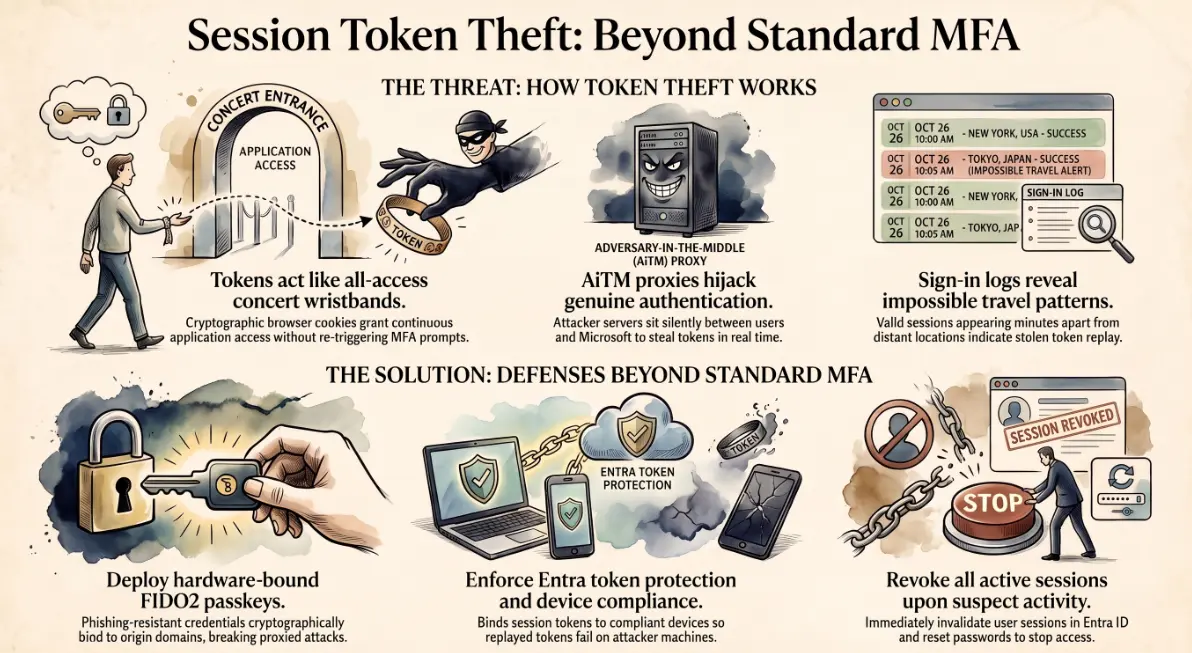
When a user successfully authenticates to Microsoft 365, the system issues a session token — a small cryptographic credential stored in the browser as a cookie. Think of it as a wristband at a concert venue: you show ID and a ticket at the door once, and from that point on, the wristband is what grants you entry to every area. Nobody checks your ID again.
Session tokens work the same way. Once issued, they allow continuous access to Exchange, Teams, SharePoint, and every other connected application — without re-authentication — for hours or even days depending on how your tenant is configured.
If an attacker steals that wristband, they get everything the legitimate user has access to. The MFA prompt already happened. It will not happen again.
How adversary-in-the-middle phishing kits steal the token in real time
Traditional phishing sends the victim to a fake login page and captures credentials. Adversary-in-the-middle (AiTM) phishing goes further. The attacker operates a reverse proxy — a server that sits silently between the victim and the real Microsoft login page.
The victim receives a convincing phishing email and clicks the link. They are proxied through to the real Microsoft authentication flow, so everything looks legitimate — the correct URL structure, the real MFA challenge, the genuine Microsoft branding. The victim completes authentication successfully. In the background, the attacker's server captures the session token that Microsoft issues at the end of that flow.
The attacker now replays that token from their own browser. Microsoft sees a valid, post-MFA session token and grants access. Kits capable of this — including Evilginx, Muraena, and the widely distributed Caffeine platform — are available to attackers with minimal technical skill and cost less than a monthly Microsoft 365 subscription.
Warning signs in Entra ID sign-in logs
AiTM attacks leave detectable traces, but only if someone is looking. In the Microsoft Entra ID sign-in logs, watch for:
- 🌍 Impossible travel — a successful authentication from a known user location, followed minutes later by another successful session from a geographically distant IP
- 🏢 Unfamiliar ASN or hosting provider — legitimate users rarely authenticate from datacenter IP ranges; attackers relaying through cloud infrastructure frequently do
- 👻 Token replay without interactive sign-in — a session active and accessing resources with no corresponding interactive authentication event
- 🔗 New OAuth app consent grants — attackers who gain session access often immediately consent to a persistent OAuth application to maintain access even after the stolen token expires
Microsoft Sentinel, Defender for Cloud Apps, and Entra ID Protection each surface these signals. Without active monitoring, a compromise can persist for days before anyone notices an anomaly.
Defences that actually work
Standard MFA — whether SMS, authenticator app push, or TOTP code — does not stop AiTM attacks because the attacker is not bypassing authentication. They are stealing the result of it. The following controls directly address the token theft vector:
- 🔑 Phishing-resistant MFA (FIDO2 / passkeys) — FIDO2 security keys and passkeys bind the authentication credential cryptographically to the legitimate origin domain. A proxied login page has a different origin. The authentication fails at the hardware level — the attacker gets nothing even if the user completes the flow
- 🛡️ Entra ID token protection — this Microsoft feature binds the session token to the specific device that authenticated, preventing token replay from a different machine. Currently available for Conditional Access in preview — worth enabling in any tenant handling sensitive data
- ✅ Compliant device Conditional Access — require that only Intune-compliant, Entra ID-joined devices can access Microsoft 365. An attacker replaying a stolen token from their own machine will fail the device compliance check even with a valid token
- ⚡ Continuous Access Evaluation (CAE) — reduces the window of opportunity by forcing near-real-time re-validation of sessions when risk signals are detected, rather than waiting for token expiry
What to do in the first hour if you suspect token theft
Speed is critical. A compromised session gives the attacker access to email, files, contacts, and the ability to set up persistence — such as inbox forwarding rules or new OAuth consents — within minutes.
- Revoke all active sessions for the affected user in Entra ID immediately: Users → select user → Revoke sessions
- Reset the user's password to invalidate any cached credentials alongside the session
- Audit recent sign-in activity in Entra ID for the affected account — look for the impossible travel and unfamiliar IP indicators described above
- Check mail flow rules in Exchange Online for new forwarding rules the attacker may have created during the session
- Review OAuth app consents in Entra ID Enterprise Applications — remove any application the user did not knowingly authorise
- Enable a temporary Named Location block on the attacker's identified IP or ASN while investigation continues
If you find forwarding rules or OAuth grants that were not there before, treat the incident as a full compromise and escalate accordingly. Andi-Tech's cybersecurity solutions include Microsoft 365 identity hardening — from Conditional Access policy design and phishing-resistant MFA deployment to Entra ID sign-in monitoring and incident response support, so your tenant is protected against attacks that standard MFA alone cannot stop.
🔐 Is your Microsoft 365 identity configuration actually secure against modern attacks?
Andi-Tech provides a Microsoft 365 security hardening and identity protection review — covering Conditional Access policies, phishing-resistant MFA readiness, token protection, and Entra ID monitoring — so you know exactly where your exposure is before an attacker finds it.
Contact us at info@andi-tech.com
— let's review your identity setup and close the gaps that MFA alone leaves open.