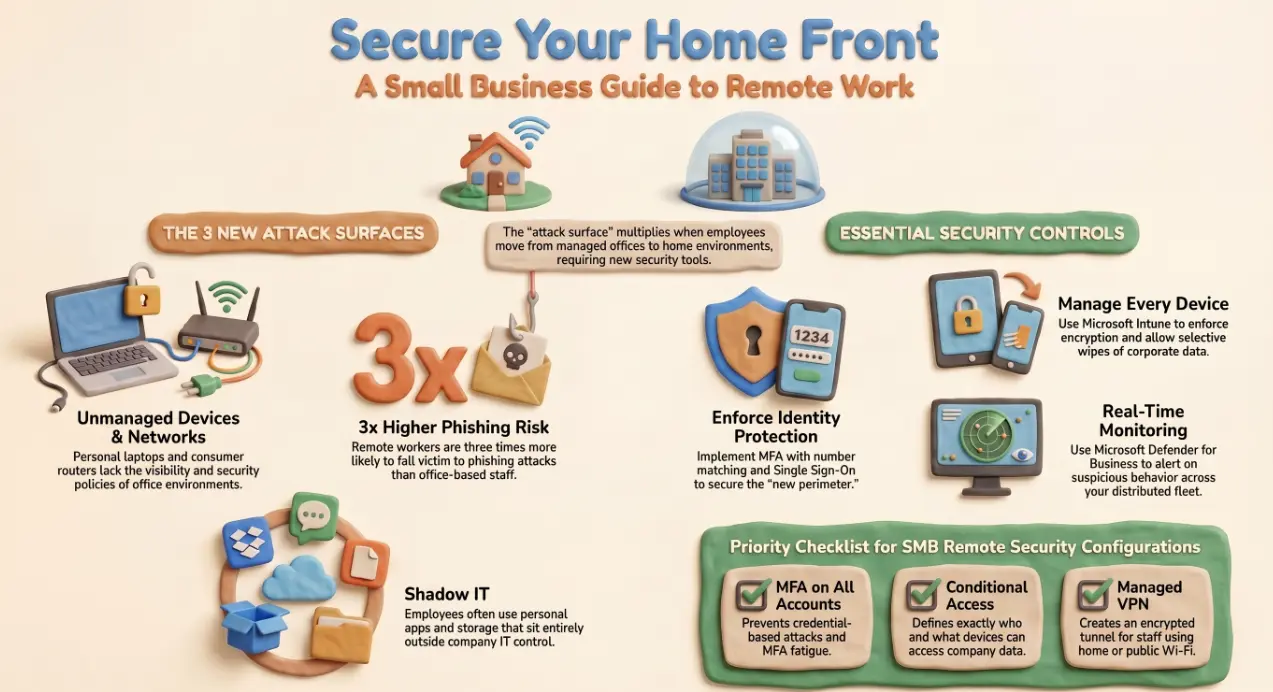
Secure remote work setup for small business: a guide
Remote workers are three times more likely to fall victim to a phishing attack than their office-based colleagues. That figure isn't a coincidence — it reflects something structural. The office environment has a managed network, physical access controls, IT visibility, and colleagues nearby to sanity-check a suspicious email. The home environment has a consumer router, a personal device possibly shared with family members, no monitoring, and nobody to ask. When your team works from home, your attack surface multiplies by the number of people on your payroll.
This article covers what those attack surfaces are and what you can do about each of them — without building an enterprise security programme on an SMB budget.
The five attack surfaces that open up when staff work from home
Understanding where the exposure sits is the first step to closing it. When an employee moves from the office to home, five new risks appear simultaneously:
- 🖥️ Unmanaged devices — personal laptops and phones that have never been enrolled in your IT systems, carry no corporate security policies, and may be used by other household members
- 📡 Home networks — consumer routers with default credentials, no network segmentation, and no visibility for your IT team
- ☕ Unsecured Wi-Fi — coffee shops, co-working spaces, and hotel networks that intercept traffic with no effort
- 🎣 Phishing and social engineering — remote workers lack the passive social safety net of the office and are more likely to be targeted and less likely to catch it
- 📱 Shadow IT — employees using personal file storage, messaging apps, and productivity tools that sit entirely outside your IT environment
None of these is unique to remote work, but remote work makes all of them worse at once.
Device security — managed vs BYOD and what you can enforce on each
The most effective baseline is a company-issued, managed device. With Microsoft Intune enrolled, you can enforce disk encryption, screen lock policies, OS patch levels, and app restrictions — and remotely wipe the device if it is lost or compromised. A managed device does what you tell it to, consistently, across every member of the team.
BYOD (bring your own device) is a reality for many SMBs, particularly at smaller headcounts. The controls you can apply are narrower, but they are not zero:
- Microsoft Intune app protection policies enforce PIN, encryption, and copy-paste restrictions within managed apps (Outlook, Teams, SharePoint) without touching personal data on the device
- Conditional Access in Entra ID can block access to Microsoft 365 from devices that are not compliant or not registered — effectively forcing a minimum standard before the device touches company data
- Selective wipe removes corporate data from a personal device without affecting the user's personal apps, photos, or messages
The principle is the same regardless of device ownership: enforce what you can at the application layer, and ensure you have the ability to revoke access and remove data without the user's cooperation if necessary.
Network security — what your staff should and should not be connecting through
Home broadband is not a secure network. It is a shared consumer service with default security settings, no traffic monitoring, and no separation between your employee's work laptop and every other device in the household.
The practical measures that make the most difference:
- VPN or Microsoft Entra Private Access — encrypted tunnels that protect traffic between the home device and company resources. Microsoft's Zero Trust Network Access approach via Global Secure Access is increasingly the cleaner alternative to traditional VPN for Microsoft 365 environments.
- Conditional Access with location-based policies — restrict access to sensitive systems from countries or IP ranges that have no legitimate business reason to authenticate
- Wi-Fi guidance for staff — a clear, one-page policy instructing employees never to connect to public Wi-Fi for work tasks without a VPN active. Simple to produce. Rarely done.
What staff should not be doing: accessing company systems from public Wi-Fi without a VPN, sharing their work device across household members, or disabling security software because it slows their machine down.
Identity and access — Conditional Access, MFA, and single sign-on at scale
Identity is the new perimeter. In a remote environment, the username and password combination is frequently the only thing standing between an attacker and your systems. That is not enough.
The three controls that every remote team needs, in priority order:
- MFA on every account — particularly Microsoft 365, Azure, VPN, and any cloud application. Number matching should be enforced to prevent MFA fatigue attacks.
- Conditional Access policies — define which users, devices, locations, and risk levels are permitted to access which applications. A zero-tolerance policy for legacy authentication (SMTP AUTH, basic auth) should be in place.
- Single Sign-On (SSO) — reduces the number of separate credentials staff manage, which directly reduces the risk of password reuse and credential stuffing. Microsoft Entra ID supports SSO across thousands of third-party applications.
Each of these is available within Microsoft 365 Business Premium without additional licensing. Most SMBs have the tools. The gap is configuration.
Monitoring and visibility — knowing what is happening across a distributed fleet
You cannot secure what you cannot see. In an office, an IT manager notices an unusual machine on the network, spots a colleague clicking something they shouldn't, or catches a problem during a walkround. In a distributed environment, none of those passive signals exist.
Minimum viable monitoring for a remote SMB fleet:
- 🛡️ Microsoft Defender for Business — endpoint detection and response included in Microsoft 365 Business Premium. Alerts on suspicious behaviour, malware, and policy violations across enrolled devices.
- 📋 Entra ID sign-in logs — a real-time audit trail of every authentication event, including location, device, risk score, and outcome. A spike in failed logins or an authentication from an unexpected country is visible here before it becomes an incident.
- 📊 Microsoft Secure Score — a dashboard that scores your Microsoft 365 security configuration and surfaces the highest-impact improvements in priority order. Useful for IT managers who need to justify changes and track progress.
Getting all of this configured correctly — and keeping it maintained as your team grows and policies change — is where most SMBs need support. Andi-Tech's cybersecurity solutions cover the full remote work security stack: device enrolment, Conditional Access design, VPN and network policy, identity configuration, and ongoing monitoring — so your distributed team is as secure as if they were sitting in a managed office.
🏠 Is your remote team as secure as your office — or are you just hoping for the best?
Andi-Tech designs and manages secure remote work environments for SMBs — from device enrolment and Conditional Access to VPN, MFA, and endpoint monitoring — so your distributed workforce doesn't become your biggest security gap.
Contact us at info@andi-tech.com
— let's build a remote setup that actually holds up under attack.