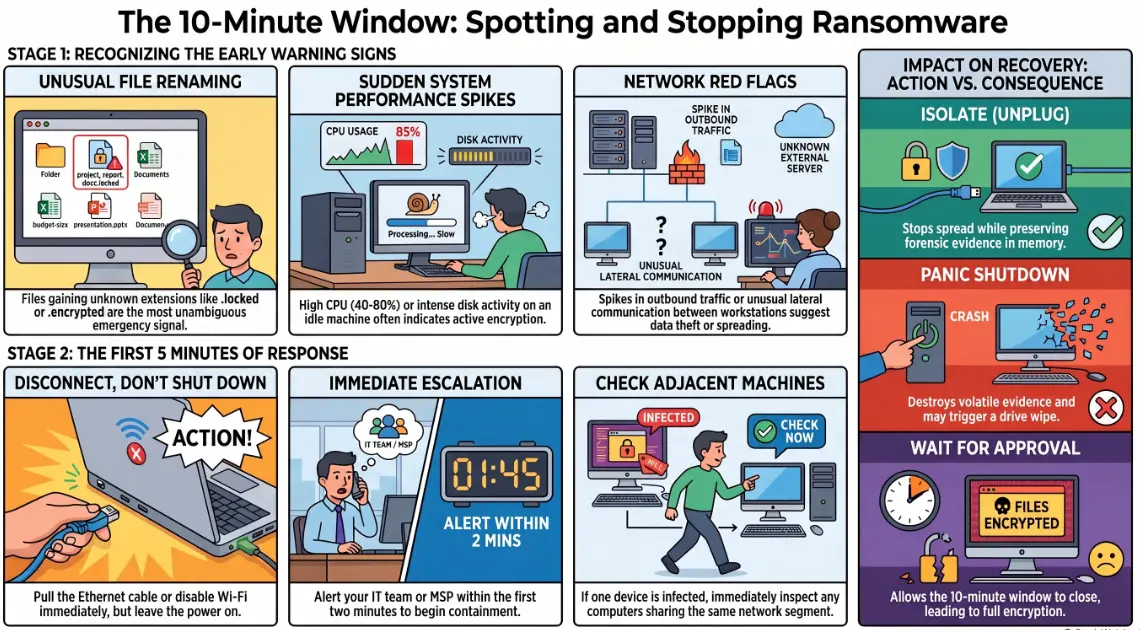
How to recognize a ransomware attack: early warning signs
A file on an accounting workstation in a Munich logistics firm renamed itself at 11:43pm on a Tuesday. Nobody saw it. By 11:53am the following morning — ten minutes of active encryption that went entirely undetected overnight — 340 gigabytes of operational data was locked. The ransom note appeared on 23 screens simultaneously. The attack had been running for hours before the first human noticed anything was wrong.
Ten minutes. That is often the entire window between early detection and full network encryption. The firms that stop ransomware before it spreads are not the ones with bigger budgets — they are the ones that know what to look for before the ransom note appears.
Early warning signs on a single workstation
Ransomware does not arrive silently. It leaves a trail on the infected endpoint that is readable in real time — if anyone is looking.
The most common early indicators on a workstation include:
- 📄 Unusual file renaming — files gaining unknown extensions (
.locked,.encrypted,.WNCRY, or random character strings) is the most unambiguous signal. A single renamed file is an emergency. - 💽 Sudden spike in disk activity — ransomware reads, encrypts, and rewrites every accessible file. Task Manager or Resource Monitor will show abnormally high disk read/write activity, often from an unexpected process.
- 🖥️ Unknown processes consuming CPU — encryption is computationally intensive. A process you do not recognise sitting at 40–80% CPU usage on a machine that should be idle deserves immediate investigation.
- 🛡️ Antivirus or security tools disabling themselves — many ransomware variants attempt to kill endpoint protection before beginning encryption. If Defender or a third-party tool suddenly stops, assume compromise until proven otherwise.
- ⚠️ Files becoming inaccessible or corrupted — users reporting they cannot open documents they could access moments ago, or that files appear damaged, is often ransomware mid-execution rather than a software glitch.
Any one of these warrants an immediate response. Multiple simultaneously means the clock is already running.
Network-level red flags IT teams often ignore
By the time ransomware is visible on a workstation, it has usually already communicated with external infrastructure and may be spreading laterally. The network tells the story first, for those monitoring it.
Signs at the network level:
- 🌐 Unusual outbound traffic volumes — ransomware often exfiltrates data before encrypting it (double extortion). Unexplained spikes in outbound bandwidth, particularly to unfamiliar IP addresses or cloud storage endpoints, are a pre-encryption signal.
- 🔗 SMB traffic between workstations — ransomware spreads across networks by exploiting shared drives and network shares. Lateral SMB traffic between endpoints that do not normally communicate is a reliable indicator of active spread.
- 🔐 Authentication failures at scale — brute-force attempts against internal accounts or a spike in failed logins across multiple systems often precede ransomware deployment by hours or days.
- 🔍 DNS queries to unusual domains — command-and-control communication typically involves domains registered recently or with nonsensical names. DNS filtering logs showing repeated queries to these domains are an early-stage warning most businesses never review.
Many of these signals sit in log files that are never examined in real time. Without active monitoring, they are only discovered in the forensic post-mortem — after the damage is done.
What to do in the first 5 minutes after detection
Speed and sequence matter more than thoroughness in the initial response. The priority is containment, not investigation.
- Disconnect the affected machine from the network immediately — unplug the ethernet cable or disable Wi-Fi. Do not wait for confirmation or approval. Every second of network connectivity is another vector for lateral spread.
- Do not shut the device down — a powered-off machine loses volatile memory that may contain the encryption key or malware artefacts needed for forensic recovery. Isolate it physically, leave it powered on.
- Alert your IT team or MSP simultaneously — the person who spots the infection should not be the only one acting on it. Get your incident response contact on the phone within the first two minutes.
- Check adjacent machines immediately — if one workstation is infected, any device that shares a network segment, drive mapping, or recent file access may already be compromised. Do not wait for symptoms.
- Preserve the ransom note if it appears — photograph or document it before doing anything else. It often contains information useful to law enforcement and incident response teams.
Why isolation beats panic-shutdown
The instinct when something appears catastrophically wrong is to shut everything down. In ransomware incidents, this instinct is frequently the wrong one.
Shutting down an infected machine before isolation can destroy the forensic evidence needed to understand the attack vector, prevent recovery of partial files, and in some variants, trigger a deliberate wipe of the drive. An isolated-but-running machine gives incident responders something to work with.
More critically, panic-shutdown of the wider network before systematic isolation means you cannot identify which machines are actively encrypting versus which are clean. A structured, segment-by-segment isolation — starting with the confirmed infected device and moving outward — is slower but produces a far better outcome than a full emergency shutdown that leaves you blind.
If your organisation has never rehearsed what "isolate this machine" means in practice — who does it, how quickly, and what they do next — this is the gap that costs businesses the most.
Building a response plan before you need one
The businesses that contain ransomware fastest share one characteristic: they made decisions before the attack happened. Under active encryption, nobody makes good decisions.
A minimum viable ransomware response plan covers:
- A named incident response contact (internal IT lead or MSP) who is reachable 24/7 and has authority to act without approval chains
- A documented isolation procedure every employee with physical access to workstations understands — unplugging a cable is a skill that needs to be communicated in advance
- An offline or immutable backup verified within the last 24 hours, stored separately from the production network
- A communication tree: who tells whom, in what order, and what they say to clients and staff in the first hour
- A tested restore procedure — a backup that has never been restored is not a backup
Rehearsing this plan once per quarter, even as a tabletop exercise, is the difference between a contained incident and a business-ending one. Andi-Tech's cybersecurity solutions include 24/7 endpoint monitoring, automated threat detection, and incident response support — so the ten-minute window before full encryption does not pass unnoticed.
🚨 By the time you see the ransom note, the window to stop it has already closed.
Andi-Tech provides 24/7 endpoint monitoring and ransomware incident response for SMBs — detecting the early signals before encryption begins and giving your team a plan to act on when every minute counts.
Contact us at info@andi-tech.com
— let's make sure your business has the detection and response capability in place before it needs it.