QR code scam how it works — and how to protect your team
In 2023, drivers in San Antonio, Texas arrived at parking meters to find a small sticker placed neatly over the official payment QR code. The sticker was professional-looking, convincing, and sent every person who scanned it to a fake payment site designed to harvest card details. Hundreds of people paid. Nobody paid the city. The stickers cost a few cents each to print. The scam required no technical skill and no access to any system. Just a printer, some adhesive, and the knowledge that people trust QR codes.
That parking meter trick has now moved into the inbox.
How a QR code actually works, in plain terms
A QR code is a visual shortcut — a pattern of black and white squares that encodes a web address (or other data) in a format a phone camera can read instantly. When you scan one, your device decodes the pattern and opens whatever URL is stored inside.
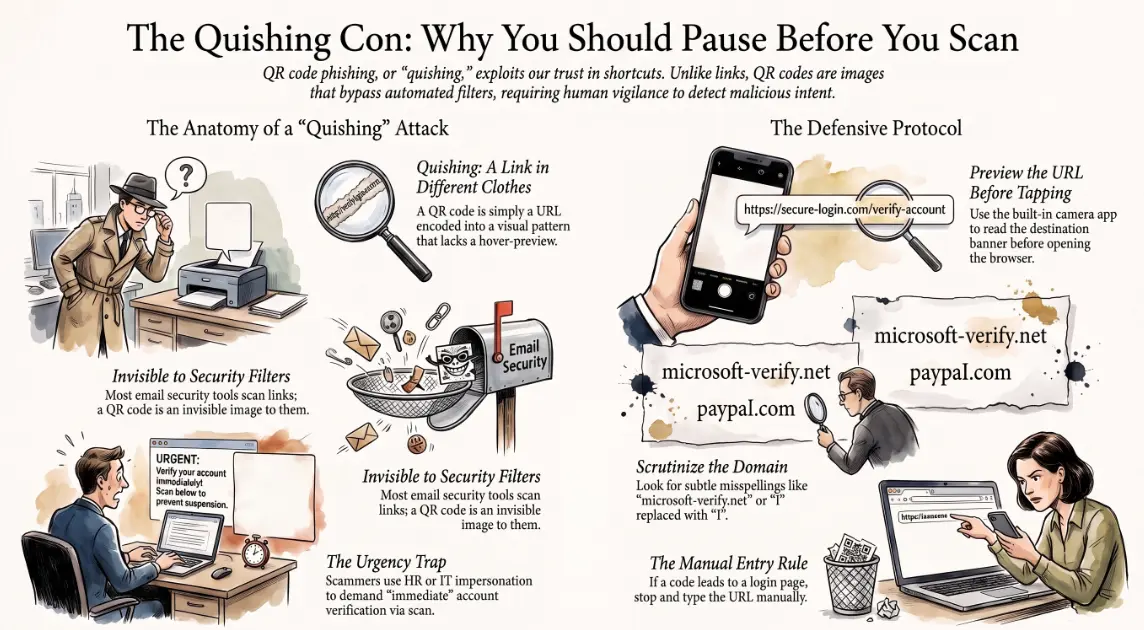
The important thing to understand is that a QR code is just a link wearing different clothes. It contains a destination, and your device goes there automatically. The critical step that web browsers provide for regular links — the ability to hover and preview the URL before clicking — does not exist for QR codes. You scan, and you go.
That gap between "scan" and "where you actually land" is exactly where scammers operate.
How scammers hijack the trust people place in QR codes
QR codes feel trustworthy. They appear in official settings — menus, car parks, boarding passes, vaccination records. They suggest that whoever placed them went to some effort. That implied legitimacy is the vulnerability.
A "quishing" attack — QR code phishing — works by placing a QR code that redirects to a malicious site. The destination might harvest login credentials, deliver malware, request a payment, or simply harvest device data the moment the page loads.
What makes quishing particularly effective right now is that most email security tools are built to scan links and attachments. A QR code embedded in an email body is, to most filters, just an image. The malicious URL lives inside the image — invisible to automated scanning, visible only when a human points a phone at it. 🎯
The attacker's goal is also familiar: urgency, authority, consequence. "Scan to verify your account before it is suspended." "Scan to confirm delivery of your parcel." "Scan to complete your two-factor authentication." The framing is designed to make the scan feel routine and the failure to scan feel risky.
Real-world examples businesses have fallen for
The attacks targeting businesses are more targeted than parking meter stickers. They are researched, personalised, and timed to look like legitimate internal communications.
Examples seen in the wild include:
- 💼 HR and payroll quishing — an email appearing to come from HR asks employees to scan a QR code to update direct deposit information ahead of payroll processing. The code leads to a credential-harvesting site styled as the company's Microsoft 365 login.
- 🖥️ IT support impersonation — employees receive an email claiming their account has been flagged for suspicious activity and must scan a code to verify identity. The destination captures their username and password.
- 📄 Invoice and supplier fraud — a finance team receives what appears to be a supplier invoice with a QR code replacing the traditional payment link. The code routes to a lookalike payment portal.
- 🏢 Physical office attacks — QR codes printed on stickers are placed on shared equipment (printers, meeting room screens, reception desks) pointing to credential-harvesting sites disguised as device setup or Wi-Fi login pages.
The physical variant is particularly hard to defend against with technology alone, because the attack surface is a piece of paper in the real world.
How to check a QR code before scanning
The good news is that the habit of pausing before scanning can be taught, and the tools to preview destinations are built into modern smartphones.
Practical steps for safer scanning:
- 📷 Use your phone's built-in camera first, do not scan immediately — most iPhone and Android camera apps will show the destination URL in a banner before opening the browser. Read it before tapping.
- 🔍 Check the domain carefully — look for subtle misspellings, extra hyphens, or unfamiliar top-level domains.
microsoft-verify.netis not Microsoft.login.microsoftonIine.com(with a capital I substituted for a lowercase L) is not Microsoft either. - ⚠️ Be suspicious of QR codes in unexpected places — a sticker over a printed QR code, a code in an email asking you to scan rather than click, or a physical code on equipment you do not recognise are all worth questioning.
- 🔐 Never scan and enter credentials in the same session without checking — if a QR code takes you to a login page, stop. Type the organisation's real URL directly into your browser instead and log in from there.
What to teach employees about quishing emails
Technology alone will not stop quishing — because the QR code is designed to bypass technology and reach the human directly. Staff awareness is the essential final layer. 🧠
The key behaviours to establish through training:
- Any email containing a QR code and a sense of urgency should be treated as suspicious by default — legitimate IT systems do not typically require employees to scan codes to verify accounts
- QR codes from HR, payroll, finance, or IT that arrive unexpectedly should be verified before scanning — a quick call or Teams message to the sender takes thirty seconds and eliminates the risk entirely
- Report, do not delete — employees who receive suspicious quishing emails should forward them to IT rather than simply deleting them, so patterns can be identified across the organisation
- Physical codes in the office deserve the same scrutiny as email links — a sticker on a printer or meeting room screen is not automatically trustworthy
Quishing is rising because it combines the visual trust of QR codes with the reach of email and the bypass capability of an image file. The businesses that weather it best will be those that have trained their teams to pause, preview, and verify — before the scan, not after. Andi-Tech's cybersecurity solutions include security awareness training designed for real-world attack methods, including quishing, so your employees recognise the red flags before they reach a credential harvesting page.
📱 Your team trusts QR codes — and attackers know it.
Andi-Tech delivers security awareness training for SMBs covering quishing, phishing, and social engineering — practical, scenario-based sessions that build the habits that protect your business where technology can't.
Contact us at info@andi-tech.com
— let's make sure your team pauses before they scan.