Microsoft Power Automate for small business: examples
A logistics coordinator at a mid-sized import firm in Rotterdam calculated it by accident. She was filling in the same Excel spreadsheet she filled in every morning — copying order numbers from an email, pasting them into a tracker, forwarding a confirmation to the warehouse, and updating a SharePoint list. Thirty minutes. Every working day. She had been doing it for two years.
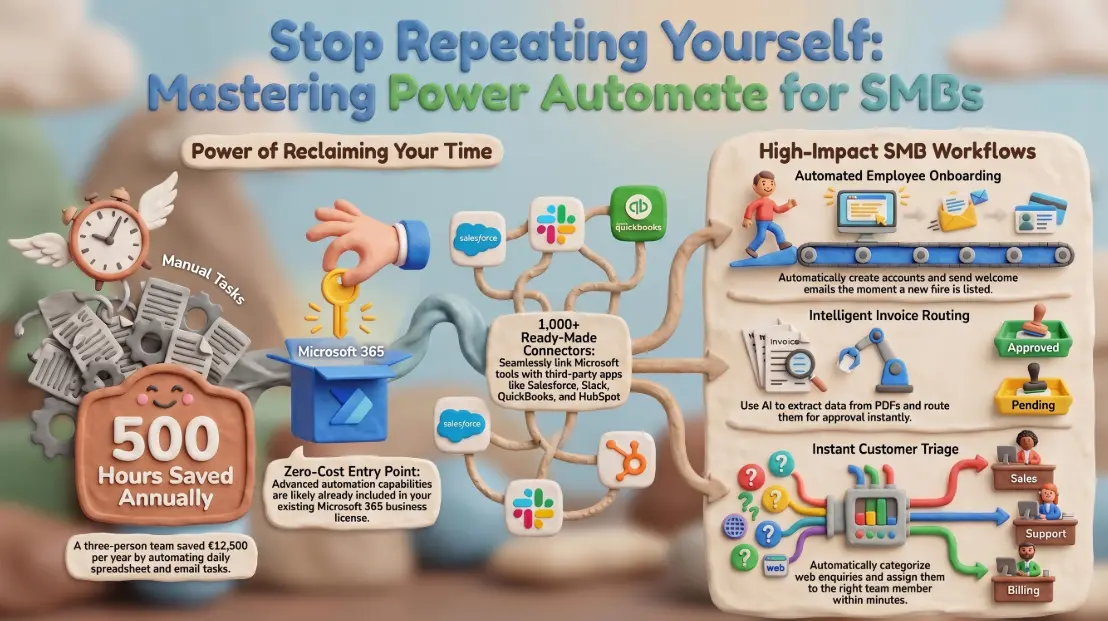
When her manager ran the numbers across the three-person operations team doing the same routine, the total came to around 500 hours per year. At a fully loaded cost of €25 per hour, that was €12,500 annually — spent on copying, pasting, and forwarding information that already existed in systems they were already paying for.
A Power Automate flow replaced the entire sequence in four hours of setup. It has run without human intervention every weekday since.
What is Power Automate and how does it fit into Microsoft 365
Microsoft Power Automate is a low-code workflow automation tool included in most Microsoft 365 business licences. It connects applications and services — both Microsoft and third-party — and triggers automated sequences based on events, schedules, or conditions.
Think of it as a set of programmable rules for your software stack. When something happens in one system, Power Automate can take action in another — without anyone needing to intervene, and without anyone needing to write traditional code.
Power Automate sits within the broader Microsoft Power Platform alongside Power Apps, Power BI, and Copilot Studio. For businesses already on Microsoft 365 Business Basic, Standard, or Premium, a capable tier of Power Automate is already included in the licence they are paying for.
Five real automation flows SMBs can build without writing code
These are the most commonly deployed flows for small and medium businesses, all buildable by an IT manager or a technically confident business user using the template library:
- 👤 New employee onboarding — when a row is added to an HR spreadsheet, automatically create an Entra ID account, send a welcome email, assign Microsoft 365 licences, and post a notification to the relevant Teams channel. Replaces a checklist that previously took IT 45–90 minutes per hire.
- 📄 Invoice approval routing — when a PDF is dropped into a designated SharePoint folder, extract key fields using AI Builder, route to the appropriate approver based on amount thresholds, and log the decision with a timestamp. Replaces email chains with no audit trail.
- 📋 Customer enquiry triage — when a form submission arrives via Microsoft Forms or a website integration, categorise by keyword, assign to the correct team member in Planner, and send an automated acknowledgement to the customer within two minutes of submission.
- 📊 Scheduled report distribution — pull data from a SharePoint list or Dataverse table on a weekly schedule, format it into a summary email, and deliver it to a distribution list. Replaces the Monday morning report that one person spends an hour producing manually.
- 📅 Contract expiry alerts — monitor a SharePoint document library for contracts with expiry dates in a metadata column, and send reminder emails to the responsible team member 60, 30, and 7 days before expiry. Replaces the spreadsheet nobody remembers to check.
Each of these uses built-in connectors and requires no code. Most can be adapted from existing templates in the Power Automate template gallery.
Connectors — what systems Power Automate can talk to out of the box
Power Automate includes over 1,000 pre-built connectors. These span the full range of tools SMBs commonly use:
- 🏢 Microsoft ecosystem — SharePoint, Teams, Outlook, Excel, Planner, Dataverse, Forms, OneDrive, Dynamics 365
- ☁️ Common SaaS tools — Salesforce, HubSpot, Zendesk, Slack, Dropbox, Google Workspace, DocuSign, Mailchimp
- 🔧 Business systems — SAP, ServiceNow, Jira, GitHub, Trello, QuickBooks
- 🌐 Generic protocols — HTTP requests, SQL databases, RSS feeds, SFTP — for connecting to systems without a dedicated connector
If a connector does not exist for a specific system, Power Automate can call any REST API directly using the HTTP action, which covers most modern business software.
Where the limits are — when Power Automate is not the right tool
Power Automate is the right tool for automating defined, repeatable sequences with clear triggers and outcomes. It is not the right tool for every automation need.
Situations where Power Automate reaches its limits:
- Complex data transformations — flows involving large datasets, multi-step calculations, or sophisticated logic quickly become difficult to maintain and debug. Azure Data Factory or custom development is often more appropriate.
- Real-time processing at volume — Power Automate runs are throttled based on licence tier. High-volume transactional processing (thousands of events per minute) is outside its design scope.
- Unstructured decision-making — flows work well when logic is deterministic. Processes that require human judgement, context, or nuance should involve humans; Power Automate should handle the surrounding administration, not the decision itself.
- Regulated workflows requiring formal audit trails — some compliance environments require certified workflow solutions rather than low-code tools. Verify requirements before automating regulated processes.
Governance and licensing — keeping automations under control as they scale
The ease of building flows is also the primary governance risk. Without oversight, organisations accumulate dozens of automations built by different people, connecting different systems, running under different accounts — and nobody has a complete picture of what is running or what it touches.
Governance practices that prevent sprawl:
- Designate a Power Automate owner or centre of excellence — even a single IT manager responsible for reviewing and approving new flows in production
- Use service accounts for flow connections rather than personal user accounts, so flows do not break when employees leave
- Store flows in solution packages within the Power Platform admin centre rather than in personal environments
- Enable DLP (Data Loss Prevention) policies in the Power Platform admin centre to restrict which connectors can share data with which other connectors
- Review the Power Platform admin centre monthly for flows with errors, orphaned connections, or unused automations
On licensing: Power Automate for Microsoft 365 (included in M365 plans) covers most common automation scenarios. The standalone Power Automate Premium plan adds premium connectors, attended and unattended RPA (Robotic Process Automation), and process mining. Most SMBs start with the included tier and upgrade specific flows as needed.
The Rotterdam team's four-hour investment paid back its first year's cost — at a conservative calculation — within three working days. Andi-Tech's Microsoft cloud services include Power Automate flow design, build, and ongoing maintenance, so your automations are built correctly from the start and kept running as your tools and processes evolve.
⚙️ How many hours a week is your team spending on tasks a flow could handle in seconds?
Andi-Tech designs and builds Microsoft Power Automate workflows for SMBs — from simple approval routing to multi-system integrations — as part of an ongoing Microsoft 365 productivity engagement.
Contact us at info@andi-tech.com
— let's identify the repetitive tasks costing your business the most and automate them properly.