Why is office Wi-Fi slow — and how to fix it
You call your internet provider. You wait on hold for twenty minutes. A technician runs a speed test and tells you your connection is fine — 200 megabits, exactly what you're paying for. You hang up. The video call still buffers. The file upload still crawls. And every day at noon, when the whole office sits down for lunch and opens their phones, everything grinds to a halt.
The problem was never your internet. The problem is the air.
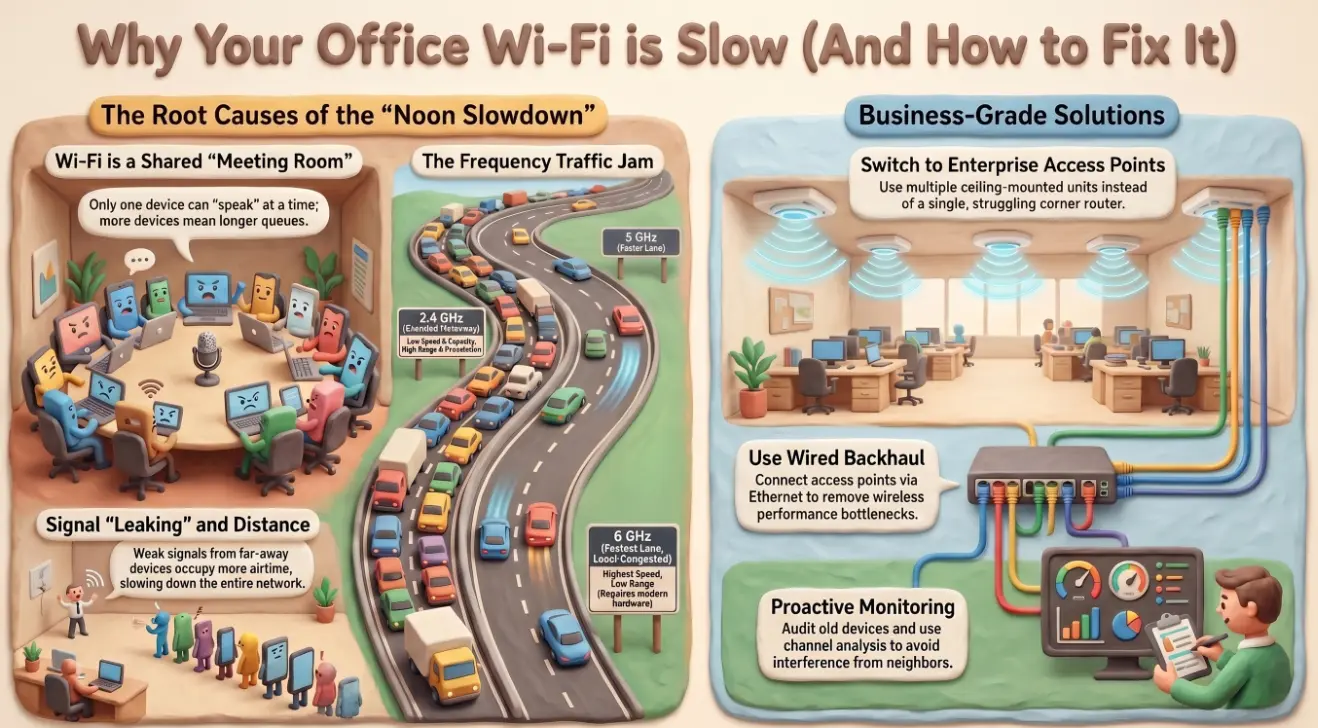
Wi-Fi is a shared medium — the traffic jam nobody told you about
Wired internet is a private lane. Data travels from your device down a cable that nobody else is using. Wi-Fi is nothing like that.
Wi-Fi is a radio signal broadcast into a shared physical space. Every device within range is listening to the same frequency at the same time. When two devices try to transmit simultaneously, they collide and have to start again — a process that repeats thousands of times per second without you ever noticing, until there are too many devices trying at once and the queue gets genuinely long.
Think of it like a meeting room where only one person can speak at a time. Two or three people, and the conversation flows. Twenty people all trying to contribute simultaneously, and nothing gets said. 🗣️
Your office doesn't just share the air with your own devices. It shares it with every device on every Wi-Fi network in the building — your neighbours' offices, the café downstairs, the flats above. At noon, when those twelve networks are all active simultaneously, the airwaves get very crowded indeed.
2.4 GHz vs 5 GHz vs 6 GHz — what the numbers mean for your office
Most business routers broadcast on two frequencies — 2.4 GHz and 5 GHz — and increasingly on a third, 6 GHz. Each is a different radio band, and they behave very differently. 📡
2.4 GHz travels further and penetrates walls more easily. It also has far fewer usable channels, which means every Wi-Fi network in the building is fighting for the same small piece of spectrum. It is the crowded motorway.
5 GHz is faster and has many more available channels, which means less interference from neighbouring networks. The trade-off is range — it doesn't travel as far and struggles more with solid walls. It is the faster road that doesn't quite reach the back office.
6 GHz (Wi-Fi 6E and Wi-Fi 7) is the newest band and currently the least congested because fewer devices support it. For offices with modern hardware, it offers the closest thing to a private lane that wireless can provide.
The practical takeaway: if your devices support 5 GHz and you are connecting them to 2.4 GHz out of habit or because the signal appears stronger, you are voluntarily sitting in traffic when a faster road is available.
Access points, mesh networks, and why one router was never enough
A single router placed in the corner of an office was never a serious network design. It was a compromise that became standard because it was cheap and nobody complained loudly enough.
A router's signal degrades with distance and obstacles. By the time it reaches the far end of a medium-sized office through two sets of walls and a kitchen, it is a fraction of its original strength. Devices that are far from the router hold on to that weak signal rather than dropping off — and a device on a weak signal occupies much more airtime to send the same amount of data, slowing everything else down in the process.
The correct solution is distributed coverage:
- 🏢 Enterprise access points — ceiling-mounted devices that each serve a defined area cleanly, managed centrally, and designed to hand off devices as they move around the office
- 🔗 Mesh networks — consumer-grade systems that use multiple nodes to extend coverage, suitable for smaller offices that need something better than one router without full enterprise complexity
- 🔌 Wired backhaul — where possible, connecting access points to the network via ethernet rather than wirelessly, which removes the biggest performance bottleneck in any multi-unit setup
One router serving thirty people across two floors is not a network. It is a point of failure wearing a network's clothes.
The most common office Wi-Fi mistakes and how to fix them
Most office Wi-Fi problems trace back to a small number of recurring errors:
- Automatic channel selection left on — routers pick their own channels on startup and rarely revisit the decision. Running a Wi-Fi analyser (free tools exist for every platform) often reveals that your router has parked itself on the same channel as four neighbours.
- Old devices dragging down the network — a single legacy device connecting on an older Wi-Fi standard forces the entire access point to slow down to accommodate it. Identifying and retiring old hardware improves performance for everyone else immediately.
- No separation between staff and guest traffic — a guest network that runs on the same radio as your main business network still shares the same airtime. Proper segmentation requires either a separate SSID on a dedicated band or a VLAN configuration that your router may not support.
- Access points positioned for aesthetics, not coverage — routers tucked inside cupboards, placed behind large monitors, or hidden in ceiling corners often create the exact dead spots they were installed to fix.
- No one monitoring anything — without visibility into which devices are connected, how much bandwidth they are consuming, and where signal strength drops off, every fix is a guess.
When to upgrade — signs your wireless infrastructure is the bottleneck
Not every slow Wi-Fi problem requires new hardware. But some do, and the signs are reasonably clear:
- Your access points are more than five years old and predate Wi-Fi 5 (802.11ac) — they were not designed for the density of modern device use
- More than fifteen to twenty devices regularly connect per access point — beyond this, congestion is structural, not fixable by configuration alone
- Signal dead zones exist in areas where people actually work, not just in stairwells
- Your business has grown or moved without a corresponding review of the network layout
- Video calls, cloud file sync, and VoIP calls all degrade at the same time of day — a symptom of airtime contention rather than bandwidth shortage
A wireless network assessment maps your current coverage, identifies interference sources, models device density, and produces a deployment plan that eliminates the guesswork. Andi-Tech's 24/7 service desk includes network infrastructure support — from wireless assessment and access point deployment to ongoing monitoring so the noon slowdown stops being a daily complaint.
📶 Is your office Wi-Fi a genuine network — or just one router doing its best?
Andi-Tech designs and deploys business-grade wireless infrastructure for SMBs — access point placement, channel planning, and ongoing monitoring so your team stays connected when it matters most.
Contact us at info@andi-tech.com
— let's fix the noon slowdown for good.