Microsoft 365 backup for small business: what you need
The finance director at a boutique consulting firm in Paris noticed the problem on a Tuesday morning in February. A senior partner had left the company the previous November — amicably, after twelve years — and in the handover process, his mailbox had been deleted. Standard offboarding. Nobody thought anything of it. Then, three months later, a client dispute surfaced that hinged on a chain of emails from his account. The IT coordinator opened Microsoft 365 admin centre, searched for the mailbox, and found nothing. Deleted mailboxes are retained for thirty days by default. This was day ninety-two.
The data was gone. The emails that could have settled the dispute in an afternoon took three months and a legal team to reconstruct — incompletely — from the client's own records.
Microsoft 365 did not fail. It did exactly what it was configured to do. The failure was the assumption that Microsoft was keeping a backup.
What Microsoft 365 actually provides by default — retention vs backup
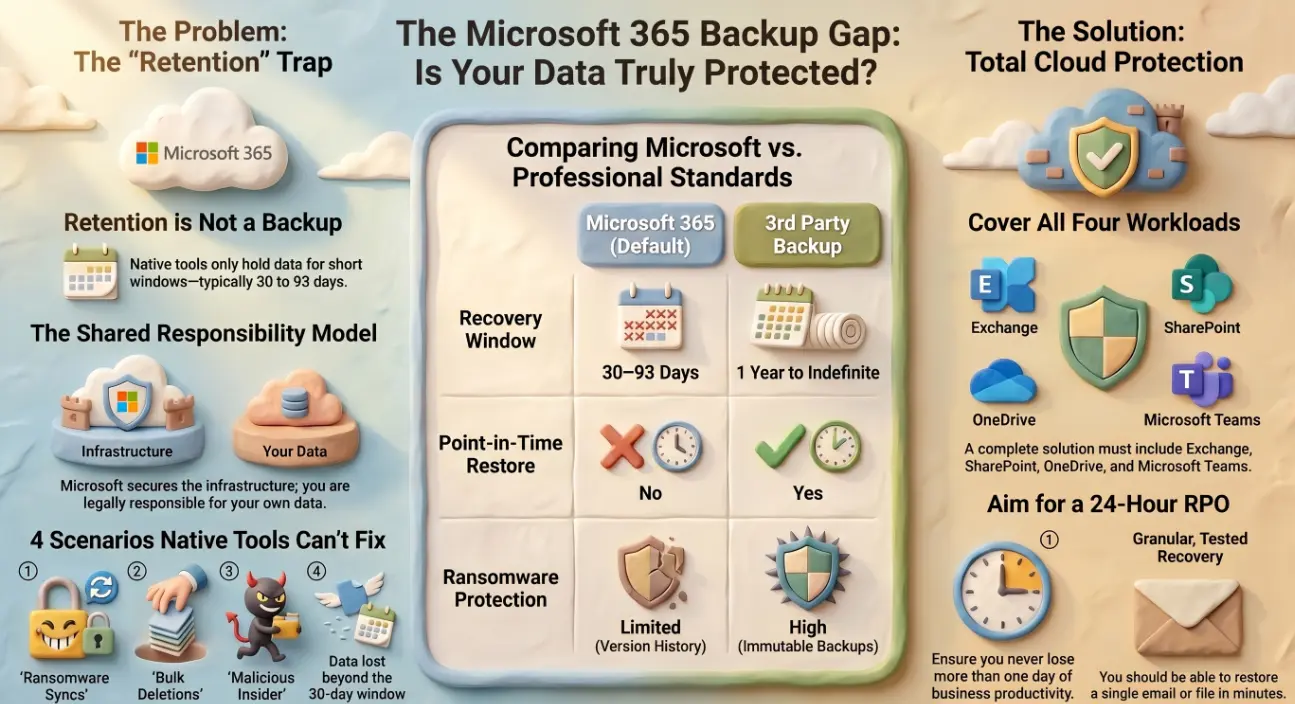
Microsoft 365 includes data retention features. These are not the same as backup, and the distinction matters enormously.
Retention policies preserve data for compliance and legal hold purposes. They prevent deletion within a defined period and allow administrators to recover items within that window. Deleted items in Exchange Online are held for 14 days in the Deleted Items folder, then for a further 14 days in the Recoverable Items folder — 30 days total by default, extendable to 30 days maximum with configuration changes.
SharePoint and OneDrive have a Recycle Bin that holds deleted files for 93 days. Version history preserves previous versions of files, but only within the retention window and only if versioning was enabled on that library.
None of this constitutes a backup in the traditional sense. There is no point-in-time snapshot you can restore from. There is no offsite copy. There is no protection against data that was deleted, corrupted, or overwritten beyond the retention window.
The four scenarios native tools cannot recover from
Understanding where the gaps are is the first step to closing them:
- 🗑️ Data deleted beyond the retention window — the Paris scenario. A mailbox deleted more than 30 days ago, a SharePoint file removed three months back, a Teams conversation from a departed employee. If it falls outside the retention period, it is gone.
- 🔒 Ransomware that propagates through synced drives — OneDrive sync means that if ransomware encrypts files on a local device, those encrypted versions sync to the cloud and overwrite the originals. Version history helps if you catch it quickly; beyond the version history limit, the originals are unrecoverable.
- ⚠️ Accidental bulk deletion — a misconfigured flow, a script that runs against the wrong tenant, an admin error that deletes a SharePoint site or distribution group. Microsoft's native tools have limited ability to recover bulk deletions beyond the recycle bin window.
- 👤 Malicious insider deletion — a departing employee who deliberately deletes their own email, files, or shared content before leaving. If the deletion falls within the retention window, recovery is possible. If it is discovered later, it may not be.
Shared responsibility model — what Microsoft covers and what you must cover
Microsoft publishes a shared responsibility model for its cloud services. It is explicit about what Microsoft protects and what falls to the customer.
Microsoft is responsible for: infrastructure uptime, service availability, physical security of data centres, and replication across availability zones to prevent hardware failure causing data loss.
You are responsible for: your data, your configurations, your access controls, and recovery from accidental or malicious deletion, corruption, and retention policy gaps.
This is not a criticism of Microsoft's service — it is a documented and reasonable division of responsibility. The problem is that many businesses, and some IT managers, have never read it. The assumption that Microsoft keeps your backups is one of the most common and costly misconceptions in SMB IT.
What to look for in a third-party Microsoft 365 backup solution
A compliant third-party backup solution for Microsoft 365 should cover all four workloads:
- 📧 Exchange Online — individual email, calendar items, contacts, and tasks, with granular item-level recovery
- 📁 SharePoint Online — site collections, document libraries, list items, and permissions
- ☁️ OneDrive for Business — individual files and folder structures, with version-aware recovery
- 💬 Microsoft Teams — channel messages, private chats, and associated files stored in SharePoint
Key capabilities to evaluate:
- Backup frequency — daily backups are a minimum; solutions offering multiple backups per day reduce the potential data loss window significantly
- Retention period — choose a solution that retains backups for at least one year; longer for regulated industries
- Immutability — backups should be stored in a way that prevents modification or deletion, protecting against ransomware that targets backup systems
- Granular recovery — the ability to restore a single email, a single file, or a single Teams message without restoring an entire mailbox or site
- Geo-redundant storage — backup data should be stored separately from your Microsoft 365 tenant, ideally in a different geographic region
Backup frequency, retention periods, and recovery objectives for SMBs
The right configuration depends on your business's tolerance for data loss and downtime, but these benchmarks apply to most SMBs:
- ⏱️ Recovery Point Objective (RPO) — how much data you can afford to lose. For most businesses, 24 hours is the maximum acceptable RPO. For businesses with high transaction volumes or regulatory obligations, this should be shorter.
- 🔄 Recovery Time Objective (RTO) — how quickly you need to restore access. Granular item-level recovery from a good third-party solution typically takes minutes. Full site or mailbox restores may take hours.
- 📅 Retention period — a minimum of one year for general business data; three to seven years for businesses subject to GDPR, HIPAA, financial regulations, or legal hold requirements
- ✅ Test your restores — a backup that has never been tested is not a backup. Quarterly restore tests for a sample of data are the minimum recommended cadence
The Paris firm had Microsoft 365 licences, retention policies, and a capable IT coordinator. What it did not have was a third-party backup — and no native Microsoft tool could recover what it needed. Andi-Tech's Microsoft cloud services include deployment and management of compliant Microsoft 365 backup solutions, configured to your retention requirements and tested regularly — so the discovery that your data is gone is never the first time you find out your backup didn't work.
💾 Assuming Microsoft backs up your Microsoft 365 data? Most businesses do — and most are wrong.
Andi-Tech deploys and manages third-party Microsoft 365 backup covering Exchange, SharePoint, OneDrive, and Teams — with the retention periods, granular recovery, and restore testing your business actually needs.
Contact us at info@andi-tech.com
— let's make sure your data is protected beyond what Microsoft's default retention covers.