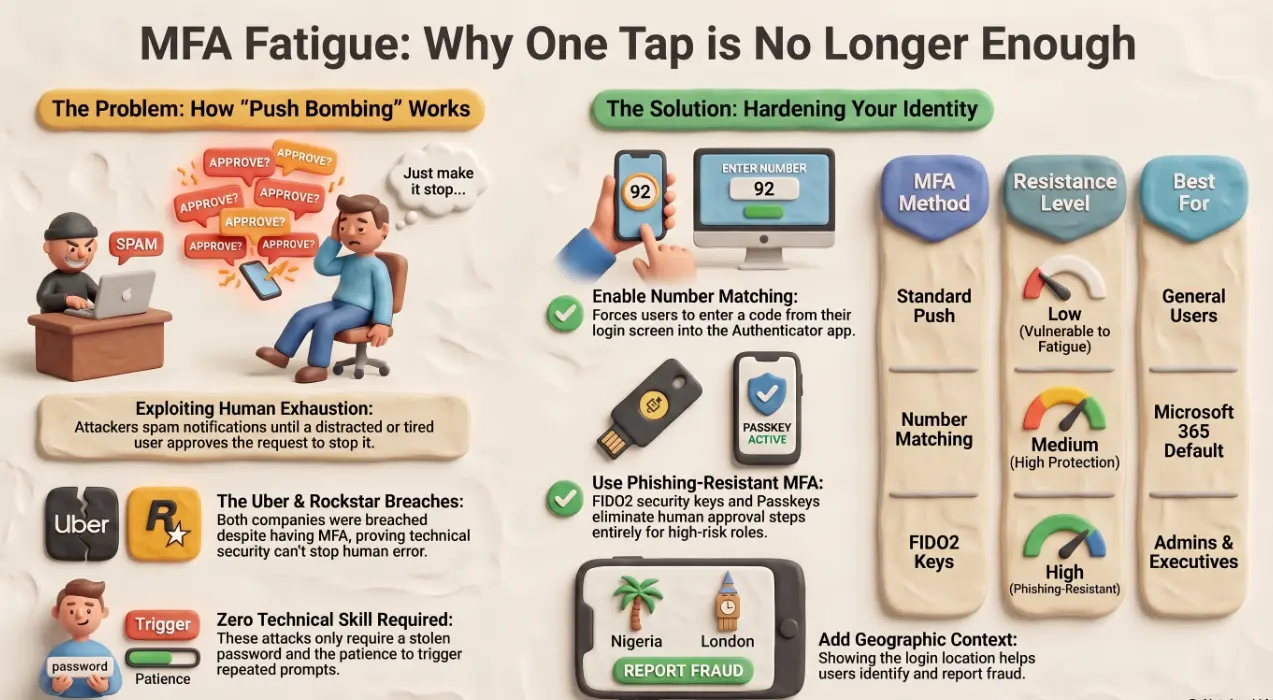
MFA fatigue attacks: why MFA alone is no longer enough
In September 2022, an 18-year-old contractor gained full administrative access to Uber's internal systems. He didn't exploit a zero-day vulnerability. He didn't break any encryption. He sent an employee repeated MFA push notifications at 1am until the employee, exhausted, approved one — and then messaged the attacker on WhatsApp to say he'd stop if the notifications did. That was enough. The attacker was in. MFA was enabled. MFA failed.
If your organisation is still treating MFA as a security finish line, this is the article to read.
What is an MFA fatigue attack — and why it works
MFA fatigue (also called push bombing) exploits the human side of authentication, not the technical side. An attacker who already has a valid username and password — obtained through phishing, credential stuffing, or a data breach — triggers repeated push notification requests to the legitimate user's phone.
The attacker is counting on one of three outcomes:
- The user approves the request to make the notifications stop
- The user assumes they accidentally triggered it themselves and approves without thinking
- The user approves late at night or during a distracted moment, expecting a routine prompt
The attack requires no malware, no sophisticated tooling, and no deep technical knowledge. It requires only a stolen password and patience — both of which attackers have in abundance.
Real business cases where MFA was defeated this way
Uber is the most cited example, but it is not an isolated one. In the same month, Rockstar Games was breached using an identical technique, with footage of GTA VI in development leaked publicly. Both companies had MFA enforced across their environments.
For small and medium businesses, the risk is equally real and arguably higher — because enterprise-grade detection tooling is often absent. A single compromised Microsoft 365 account can expose:
- Internal email threads and client data
- SharePoint and OneDrive file stores
- Teams conversations including shared files and meeting recordings
- Connected third-party applications with OAuth access
In each of these breaches, the attacker's entry point was not a technical vulnerability. It was a misconfigured authentication policy that allowed simple push approval as a valid second factor.
Number-matching and additional context — the fix Microsoft recommends
Microsoft has responded to MFA fatigue with two Authenticator app features that significantly raise the bar for push-based attacks.
Number matching requires the user to enter a two-digit number displayed on the sign-in screen into the Authenticator app prompt. An attacker triggering a push in the background has no access to that number, so the user's approval becomes meaningless without it.
Additional context shows the user the application being accessed and the approximate geographic location of the sign-in attempt. A prompt that reads "Microsoft 365 — Lagos, Nigeria" when the user is in Dublin is a clear signal to deny and report.
As of May 2023, Microsoft enabled number matching by default for all Authenticator push notifications. If your tenant was provisioned before that date and you haven't audited your Authentication Methods policies in Microsoft Entra ID, verify that number matching is active — it is not guaranteed to be enforced on older configurations.
Phishing-resistant MFA options (FIDO2, passkeys, certificate-based)
For higher-risk user groups — executives, finance teams, IT administrators, anyone with privileged access — push-based MFA should be considered a baseline, not an endpoint. Phishing-resistant methods eliminate the human approval step entirely:
- 🔑 FIDO2 security keys (e.g. YubiKey) — physical hardware that cryptographically verifies both the user and the legitimate site. Cannot be phished or push-bombed.
- 📱 Passkeys — device-bound cryptographic credentials, increasingly supported across Windows Hello, iOS, and Android. No shared secret that can be intercepted.
- 🏢 Certificate-based authentication (CBA) — uses a digital certificate tied to the user's device or smart card. Supported natively in Microsoft Entra ID and suitable for regulated environments.
Microsoft's own Zero Trust guidance recommends phishing-resistant MFA for all privileged roles. Conditional Access policies in Entra ID can enforce this by role, group, or risk level — ensuring that your standard users have strong push MFA while your admins are on FIDO2 or CBA.
How to audit your current MFA setup in Microsoft Entra ID
A targeted audit of your authentication configuration should cover these areas:
- Authentication Methods policy — navigate to Entra ID > Protection > Authentication Methods. Confirm number matching is enforced, not just enabled. Check which methods are active and for which user groups.
- Conditional Access policies — review which policies enforce MFA, and whether any gap conditions exist (unmanaged devices, legacy authentication protocols, service accounts).
- Sign-in logs — filter for MFA failures and interrupted sign-ins. A spike in denied push notifications from a single account is a direct indicator of a fatigue attack in progress.
- Privileged roles — run an Entra ID access review for all Global Administrators, Exchange Administrators, and Security Administrators. Verify each is assigned a phishing-resistant method.
- Legacy authentication status — confirm that basic authentication (SMTP AUTH, IMAP, POP3) is blocked via Conditional Access. Legacy protocols bypass MFA entirely.
This audit is not a one-time exercise. Authentication policies drift as users are onboarded, roles change, and Microsoft releases new features. A quarterly review cadence is the minimum for any business handling sensitive client data.
Getting this configuration right requires more than enabling a toggle in the admin portal. Andi-Tech's cybersecurity solutions include full Entra ID and Conditional Access configuration, ensuring the right MFA method is enforced per user, per role, and per risk level — not left at default and assumed to be sufficient.
🔐 Is your MFA configuration actually protecting you — or just ticking a box?
Andi-Tech audits and configures Microsoft Entra ID and Conditional Access policies to enforce the right authentication method for every user group, close legacy protocol gaps, and eliminate the conditions that make MFA fatigue attacks possible.
Contact us at info@andi-tech.com
— let's make sure your MFA setup is built to resist the attacks that are actually happening right now.