Azure Virtual Desktop vs VPN for small business
In March 2020, a professional services firm in London told its 60 staff to work from home and deployed a VPN over a weekend. It worked well enough. Two years later, the VPN was still there — slower than it used to be, routinely blamed for call quality problems, and quietly despised by anyone who needed to access the CAD software or accounting platform the office ran on a local server. The IT manager had received 47 helpdesk tickets about VPN connectivity in a single quarter.
That situation is not unusual. The pandemic forced a remote access decision that many businesses never revisited. This article helps you revisit it properly.
How traditional VPN works and where it falls short at scale
A VPN — Virtual Private Network — creates an encrypted tunnel between a remote device and your company network. Once connected, the remote device behaves as if it is physically in the office. Files, applications, printers, and internal systems become accessible as they would be on-site.
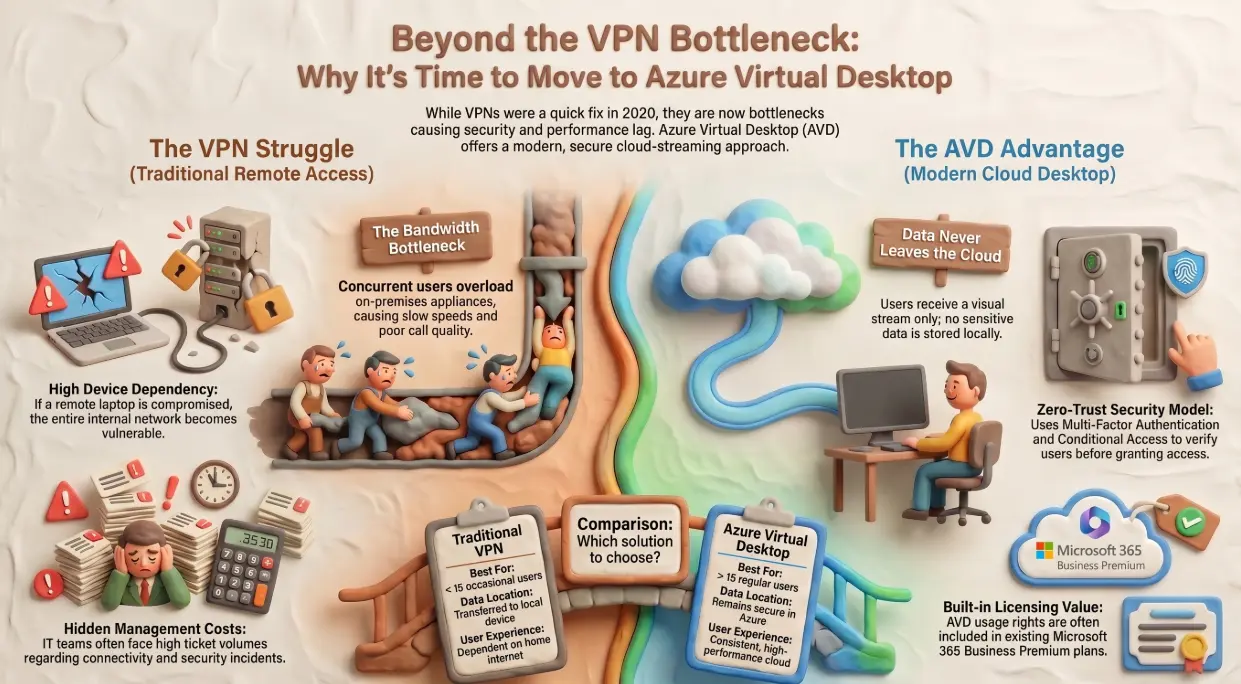
The problem is that this architecture was designed for occasional remote access by a small number of users — a travelling salesperson, a senior manager working from home occasionally. It was not designed for an entire workforce connecting simultaneously, all day, every day.
The limitations that surface at scale:
- ⚡ Bandwidth bottleneck — all remote traffic routes through the VPN concentrator, which is typically an on-premises appliance with fixed capacity. As concurrent users increase, performance degrades for everyone.
- 🔓 Split tunnelling risk — when VPN clients are configured to only route corporate traffic through the tunnel, internet traffic bypasses security controls entirely, creating an unmonitored path into and out of the device.
- 💻 Device dependency — a VPN connects the device to the network, which means whatever is on the device comes with it. A compromised endpoint with an active VPN session has authenticated access to your internal systems.
- 📉 Application performance — latency-sensitive applications (VoIP, video conferencing, ERP systems) perform poorly when all traffic is routed through an on-premises appliance before reaching the cloud services they actually need.
What Azure Virtual Desktop is and how it delivers applications differently
Azure Virtual Desktop (AVD) — formerly Windows Virtual Desktop — takes a fundamentally different approach. Instead of connecting the remote device to the network, AVD runs the desktop or application in Microsoft's Azure data centres and streams only the visual output to the user's screen.
The user sees and interacts with a full Windows desktop. The data never leaves Azure. The device on the user's desk is essentially a display terminal — a thin client that sends keystrokes and mouse movements and receives a compressed video stream in return.
This architecture inverts the security model entirely. The data, applications, and processing all live in a hardened Azure environment. The local device holds nothing. An employee working from a café on a personal laptop presents almost no risk to corporate data, because none of it is on the device and none of it passes through the local network.
AVD supports persistent desktops (one dedicated virtual machine per user), pooled desktops (multiple users sharing a pool of virtual machines), and RemoteApp (individual applications streamed without a full desktop). Each model suits different workload profiles.
Security comparison — which architecture reduces attack surface more
This is where the two approaches diverge most significantly.
A VPN gives authenticated devices access to the network. If those credentials are compromised — through phishing, credential stuffing, or a device breach — the attacker has authenticated access to everything the user could reach. Lateral movement within the network is the natural next step.
AVD combined with Microsoft Entra ID and Conditional Access enforces a different model:
- The device never touches the network — it touches Azure
- Conditional Access can require compliant devices, MFA, and location-based restrictions before a session is established
- All data remains in Azure, where it is subject to Microsoft's security controls, backup policies, and audit logging
- Session recordings and user activity monitoring are available natively
For businesses that handle sensitive data — client files, financial records, health information — the AVD architecture substantially reduces the blast radius of a compromised endpoint. There is nothing on the device to steal.
Cost and performance — cloud hosted vs on-premises infrastructure
The cost comparison depends heavily on how each solution is deployed and managed.
VPN costs are often underestimated. The visible costs — appliance hardware, licensing, firewall rules — are the smaller part. The hidden costs are IT time managing connectivity issues, security incidents involving compromised VPN credentials, and the ongoing performance complaints that erode productivity without appearing on a balance sheet.
AVD costs are consumption-based. You pay for virtual machine compute time, storage, and licensing. For a workforce that works standard business hours, this model is efficient — machines can be deallocated outside working hours. For a 24/7 operation, the economics shift.
Key cost factors for AVD:
- 📋 Microsoft 365 Business Premium or E3/E5 licensing — AVD usage rights are included in these plans for eligible users, which many SMBs already hold
- ☁️ Azure compute costs — sized to the workload; light office users need less than graphics-intensive or data-heavy roles
- 🌐 Network egress — data leaving Azure incurs charges; for data-heavy workloads this needs to be modelled before deployment
- 🔧 Management overhead — AVD environments require ongoing image management, patching, and monitoring; typically handled by an MSP rather than internally
For businesses already on Microsoft 365 Business Premium, the licensing barrier to AVD is lower than most IT managers realise.
Which solution is right depending on business size and use case
Neither solution is universally superior. The right choice depends on your workload, your headcount, and your risk appetite.
VPN remains appropriate when:
- Remote access is occasional and limited to a small number of users
- All critical applications run on-premises and cannot be moved to the cloud
- Budget for AVD infrastructure is genuinely not available
AVD is the stronger choice when:
- More than 15–20 users require regular remote access
- You handle sensitive data and need to eliminate data-on-device risk
- Your applications are already cloud-hosted or compatible with virtualisation
- You want to simplify device management — any device, anywhere, with no corporate configuration required on the endpoint
The hybrid approach — AVD for high-risk or data-sensitive roles, VPN for limited internal access by IT or operations staff — is a viable middle ground for businesses that cannot migrate everything immediately.
Choosing the right architecture requires an honest assessment of your current workload, your security posture, and your growth trajectory. Andi-Tech's Microsoft cloud services include AVD deployment, VPN architecture review, and hybrid remote access design — so the solution you end up with is built for how your business actually works, not how it worked in 2020.
☁️ Still running the VPN you deployed in a hurry three years ago?
Andi-Tech can assess your current remote access setup, compare it against Azure Virtual Desktop for your specific workload, and deploy whichever solution better fits your security requirements and budget.
Contact us at info@andi-tech.com
— let's design a remote access architecture that was built for the way your team works today.