How to write better AI prompts for work
Two employees at the same company ask their AI assistant to write a follow-up email to a client who missed a meeting. The first types: "Write a client email." They get three bland sentences that could have come from a 2009 template. The second types a prompt with a role, context, and a format instruction — and gets something ready to send in 30 seconds. Same tool. Same company. Completely different result — because of a single skill: knowing how to prompt.
This article gives you five formulas you can copy, adapt, and use today across Microsoft Copilot, ChatGPT, or any other AI tool your team relies on.
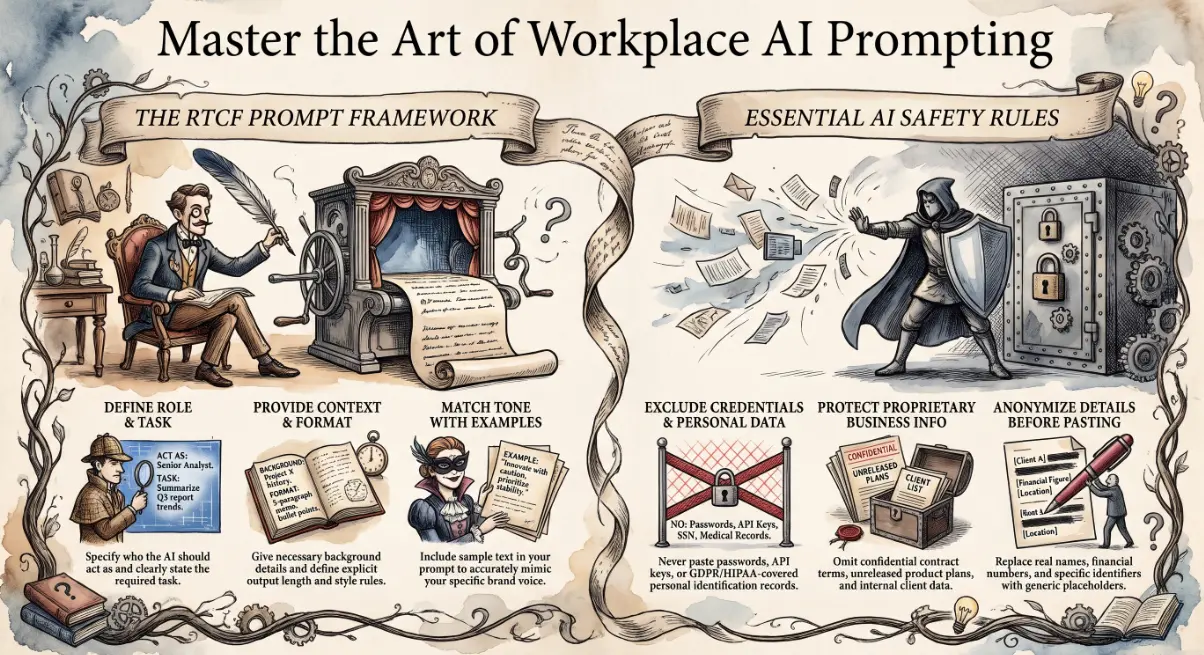
The Role–Task–Context–Format formula
Before the five prompts, you need one framework. Every strong AI prompt answers four questions:
- Role — who should the AI be? ("You are a professional business writer...")
- Task — what exactly do you need? ("Write a follow-up email...")
- Context — what does the AI need to know? ("...to a client who missed our onboarding call. Our tone is professional but warm.")
- Format — how should the output look? ("Keep it under 100 words. No subject line needed.")
Most people only give the task. The other three are what separate a generic result from one that's actually useful. Once this pattern becomes habit, prompting becomes fast — and the output stops needing so much editing.
Five prompts ready to use at work
These are starting points. Paste them in, adjust the details in brackets, and run them. Each one follows the Role–Task–Context–Format structure.
Professional email reply
You are a professional business writer. Write a reply to this email on my behalf.
My tone is [confident but approachable]. The reply should [acknowledge their concern,
confirm next steps, and close warmly]. Keep it under 150 words.
Here is the original email: [paste email]
Meeting summary with action items
Summarise the following meeting notes into three sections: key decisions made,
open questions, and action items with owners. Use bullet points.
Be concise — one line per item. Notes: [paste notes or transcript]
Proposal section draft
You are writing a business proposal for [company name], a [brief description].
Draft the "Why us" section in 2–3 short paragraphs. Focus on
[reliability / Microsoft expertise / fast response times — choose what applies].
Write in first person plural ("We..."). Avoid sales clichés.
Spreadsheet formula
I am using Microsoft Excel. I need a formula that [describe what you want to calculate
— e.g. "looks up a client name in column A and returns the corresponding invoice total
from column D"]. Explain what the formula does in one sentence before giving it to me.
Policy rewrite in plain English
Rewrite the following internal IT policy so that a non-technical employee can understand it.
Use short sentences. Remove jargon. Keep all key requirements intact.
Add a one-line summary at the top. Original policy: [paste text]
Giving examples: the fastest way to match your tone
If you want the AI to sound like you — or like your brand — give it an example. Add one line to any prompt:
Here is an example of our usual tone. Match this style:
[paste a paragraph from a previous email or document you're happy with]
This is called few-shot prompting, and it works better than trying to describe tone in the abstract. "Professional but not stiff" means different things to different people. A real example is unambiguous.
Use it for anything where voice matters: client communications, proposals, or marketing copy. It's the fastest way to close the gap between what the AI produces and what you'd actually send.
What never to paste into a prompt
AI tools send your prompt text to a third-party model. That means some content should never enter a prompt under any circumstances:
- Passwords, API keys, or authentication credentials
- Personal data covered by GDPR or HIPAA — names, addresses, health records, financial account details
- Confidential contract terms or unreleased product information
- Client data you are not authorised to share externally
This applies even when the tool is enterprise-licensed and marketed as private. Default to treating every prompt as if it were visible. If the content is sensitive, anonymise it first — replace names with placeholders, remove specific figures, and strip identifiers before pasting. 🔐
Getting your team consistent on safe-use habits matters as much as teaching them to prompt well. One careless paste can cause a compliance incident that no email template will fix. If your business is deploying Microsoft Copilot or integrating AI tools across Microsoft 365, our Microsoft cloud services include Copilot deployment, safe-use policy setup, and team training so adoption goes smoothly and responsibly.
🤖 Want your team to get real value from Copilot and ChatGPT — not just experiment with it?
Andi-Tech runs practical AI adoption workshops for SMB teams: covering prompt technique, Microsoft Copilot setup, and safe-use policies tailored to your business.
Contact us at info@andi-tech.com
— let's turn your team into confident AI users, not frustrated ones.