🖨️ How Printers Work — A Simple Story from Digital to Paper
Imagine you’re a chef. Your customer sends in a picture of a beautiful cake they want — colors, shapes, everything perfect. You can’t just guess the cake — you need a recipe. In the world of printing, your computer is the chef, and the printer is the kitchen that turns that recipe into a delicious, real cake… except the cake is a printed page. Let’s walk through the kitchen together and see what happens behind the scenes.
📦 Step 1: The Recipe Comes In — Digital Data
The moment you hit Print, your computer packages up all the information (text, images, shapes) and sends it to the printer. Think of it as writing out a recipe with precise instructions. The printer receives this and starts planning, deciding how to place each dot of color on paper. That’s the first step before any ink or toner touches the page.
💦 Inkjet Printers — Tiny Droplets Painting the Page
Most home printers you’ve seen use inkjet technology. Here’s how they actually paint your pages:
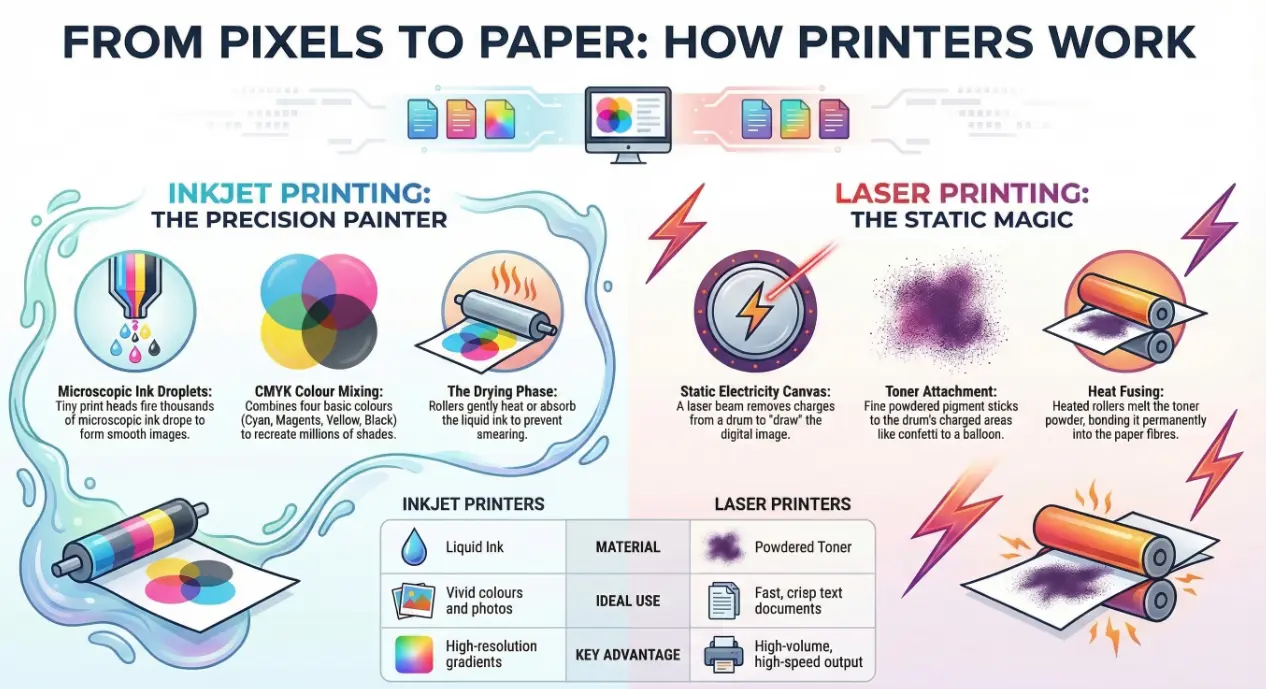
Picture tiny spray guns moving back and forth over a sheet of paper. These spray guns are the print head, and they fire thousands of microscopic droplets of ink — so tiny that to the naked eye they look like a solid line or smooth image.
The printer pulls the paper through while the print head glides left and right, spraying exactly what’s needed — just like a precise painting robot. On a full-color print job, the printer combines four basic ink colors (cyan, magenta, yellow, and black) to recreate millions of shades.
Once the ink hits the paper, it needs a moment to dry. Most printers use rollers that gently heat or absorb the ink to prevent smears — that’s why the page might feel warm or slightly damp right out of the tray.
This whole process happens at high speed, with the printer stepping the paper and jets working together to cover the page with tiny drops until your picture or document appears.
⚡ Laser Printers — Static Magic and Toner Powder
Now let’s step into a different kitchen: the laser printer. This one doesn’t spray ink. It uses something that sounds like science fiction — a laser beam — and a powder called toner.
Here’s the fun analogy:
1. Static Electricity Canvas: First, the printer prepares a drum, a cylinder that can hold an electric charge. It coats the entire drum with a uniform charge.
2. Laser “Painting”: A laser shoots tiny beams of light onto that drum, selectively removing the charge in the shape of the image or text you want to print. Where the laser removes the charge is where the image will be.
3. Toner Attachment: Toner is a fine powdered pigment that sticks only to the parts of the drum where the charge was changed. This is similar to static sticking bits of confetti to a balloon when you rub it on your hair.
4. Paper Transfer: Next, the paper passes close to the drum. Static electricity pulls the toner particles off the drum and onto the page in the exact pattern the laser drew.
5. Fusing the Print: Finally, rollers that act like a tiny heated press melt and bond the toner into the paper so it won’t rub off — this is why a fresh print feels warm.
All of this happens in a fraction of a second and — because it’s driven by static electricity and heat — laser prints are fast and crisp, making them great for text-heavy documents and high-volume printing.
🎨 Why Color and Quality Matter
Both inkjet and laser printers use a mixture of black and color to create prints. Inkjet printers mix tiny colored dots at high resolution so your eye sees smooth gradients, while laser printers often hold four toner cartridges (cyan, magenta, yellow, and black) to produce accurate color prints.
This is similar to how an artist mixes paint — but on paper using either droplets of liquid ink or tiny toner particles.
🔄 Everyday Workflow — From Keyboard to Paper
So what’s this whole journey like as a story?
1. You press Print — your computer gets the message.
2. The printer plans the print job internally, preparing head movements or drum charges.
3. Paper feeds into the machine.
4. Inkjet: Thousands of tiny droplets are sprayed where needed.
5. Laser: Laser light draws an electrostatic image, toner sticks where needed, then heat fuses it on.
6. You get your freshly printed page in the output tray — ready to read, file, or share!
This magical transformation from digital to physical happens quietly every time you hit Print. Each page is a tiny masterpiece built from millions of dots and charges working in perfect harmony.
🧠 Why Printers Are Still Relevant
Even in a cloud-filled world where screens are everywhere, printers bring your digital work into the real world — hard copies of reports, photos for the fridge, invoices for clients, and so much more. They take complex digital instructions and produce a physical result we can touch and read — a bridge between two worlds.
📩 Want to Use Your Printer Better?
Understanding how printers work helps you pick the right type for your needs — inkjet for vivid color prints, laser for fast text output, and all-in-one machines for multi-use offices.
📧 Have questions about optimizing printing, choosing the right model, or fixing common issues? Reach out to us anytime at info@andi-tech.com — we’re happy to help make printing simple and reliable.