📉 When a Data Breach Happens — What to Do (And How to Feel)
Imagine waking up to an email from a company you use every day: “We’ve detected a data breach.” Suddenly your morning coffee feels a bit weaker, and your mind races: Did they get my passwords? Bank info? Photos? It’s normal to feel anxious — but there’s a clear, manageable path forward that protects you and helps everyone else too.
Let’s walk through that path like a story — not technical gibberish, but real steps that give you control and confidence.
🔎 Step 1: Pause and Confirm What Happened
Right away, take a deep breath. Don’t panic.
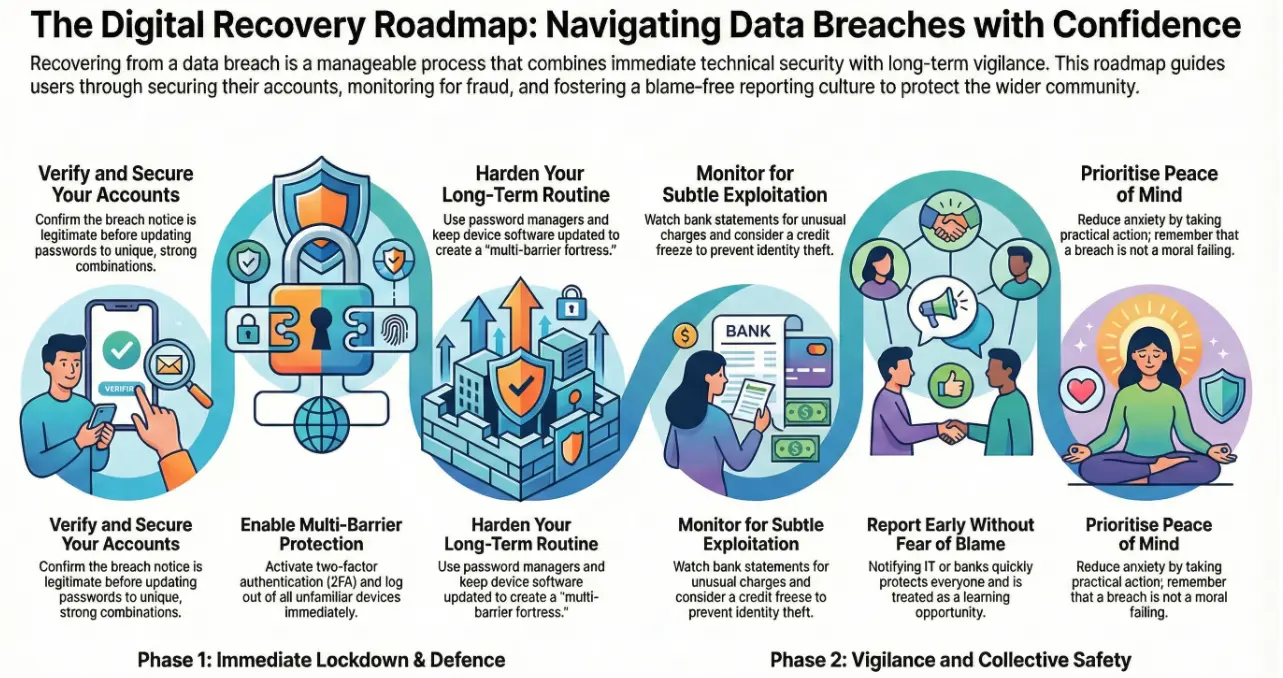
First, make sure the breach notice is legitimate. Authentic companies will often send official notifications explaining what happened and which data was affected. Confirm with the organization that the breach is real before you act on anything else.
This is like checking that a fire alarm isn’t a false alert — you don’t ignore it, but you also don’t immediately jump out the window.
🔐 Step 2: Secure Your Accounts
Once you know something’s wrong, go immediately to your affected accounts.
- Change your passwords to unique, strong combinations — no reused passwords.
- Turn on two-factor authentication (2FA) wherever possible — a second code from your phone or an app adds extra defense.
- Log out of all devices and remove unfamiliar ones from your accounts.
Think of this like changing the locks on your house after a key goes missing — you’re not overreacting, you’re securing your belongings.
📊 Step 3: Watch for Strange Activity
After a breach, attackers often try to exploit the leaked data in subtle ways.
- Keep an eye on bank and credit card statements for weird charges.
- Check your credit reports; if your financial info was exposed, consider a credit freeze so no new accounts can be opened in your name.
- Watch for phishing emails that reference the breach — scammers use fear to trick you into clicking bad links.
This vigilance is like keeping an eye on your mailbox after someone tries to steal your letters — annoying, but protective.
📞 Step 4: Report Suspicious Things
If you see something weird — an unauthorized charge, a login you didn’t make, or a strange email — report it right away to:
- Your bank or credit card issuer
- The service where your account was breached
- A trusted authority or help centre if required
Reporting helps stop further damage. Acting quickly can prevent fraud from escalating.
Think of it like telling building security if you see someone trying doors they shouldn’t be trying. It helps protect everyone.
🧠 Step 5: Look After Your Peace of Mind
Getting breached feels personal — like someone peeked inside your digital drawer. That emotional impact matters.
It’s normal to feel:
- Worried
- Frustrated
- Violated
What helps most is action and clarity: knowing specific steps you can take reduces anxiety dramatically. Experts studying security communication find people feel better when guidance is practical, understandable, and free of blame.
Remember: breaches happen to reputable companies and everyday people. It’s not a moral failing on your part — it’s a wake-up call to tighten security.
🤝 Step 6: Report Early — In a Blame-Free Way
One of the biggest psychological blocks after an incident is fear of being blamed. People often hesitate to tell IT or security teams because they think “it was my mistake.”
But these incidents are rarely about blame — they’re about safety. Just like telling a teacher about a broken window helps the whole class stay safe, reporting suspicious activity helps protect your team and your community.
Encourage reporting by creating a supportive environment:
- Use phrases like “We want to help you, not punish you.”
- Reward early reporting with praise or small recognition.
- Treat incidents as learning opportunities, not blame games.
A positive, supportive mindset improves reporting and reduces the emotional toll on the person who first noticed the issue.
🔄 Step 7: Learn And Harden Your Defenses
Use what happened as a launchpad for improvement:
- Update security questions and login methods
- Use password managers to avoid reuse
- Be cautious about links and attachments
- Keep devices updated with patches
Good habits are like stronger doors and better locks — they make you harder to target next time. Adding steps like 2FA turns a single-lock door into a multi-barrier fortress.
🛡️ Final Thoughts — You’re Not Alone
A data breach can feel shocking, but it’s not the end of your digital life. By acting methodically, securing your accounts, monitoring activity, and reporting early — you take back control. Every report helps organisations spot patterns faster and protect others from the same risk.
Cybersecurity isn’t about perfection — it’s about vigilance, patience, and community.
To wrap up:
- Secure your accounts immediately
- Monitor for suspicious use
- Report early and without fear
- Build stronger routines going forward
If you ever feel unsure what to do after an incident, reach out to trusted support or IT professionals — getting help quickly can make all the difference.
Need Guidance After a Security Incident?
Whether you’re an individual or a business, Andi-Tech can help you respond calmly, secure your systems, and strengthen your defenses for the future.
📧 Reach us anytime at info@andi-tech.com